Overview
This solution implements SQL Server Audit to provide comprehensive monitoring of privileged activities, security changes, login activity, database modifications, permission changes, backup operations, and audit configuration changes. Audit records are written to secured audit files and can be integrated with SIEM platforms such as Splunk or leveraged by SQL Agent jobs to generate email alerts for high-risk activities.
The solution enhances security visibility, supports regulatory compliance, strengthens detective controls, and enables forensic investigations by maintaining an immutable audit trail of critical SQL Server activities.
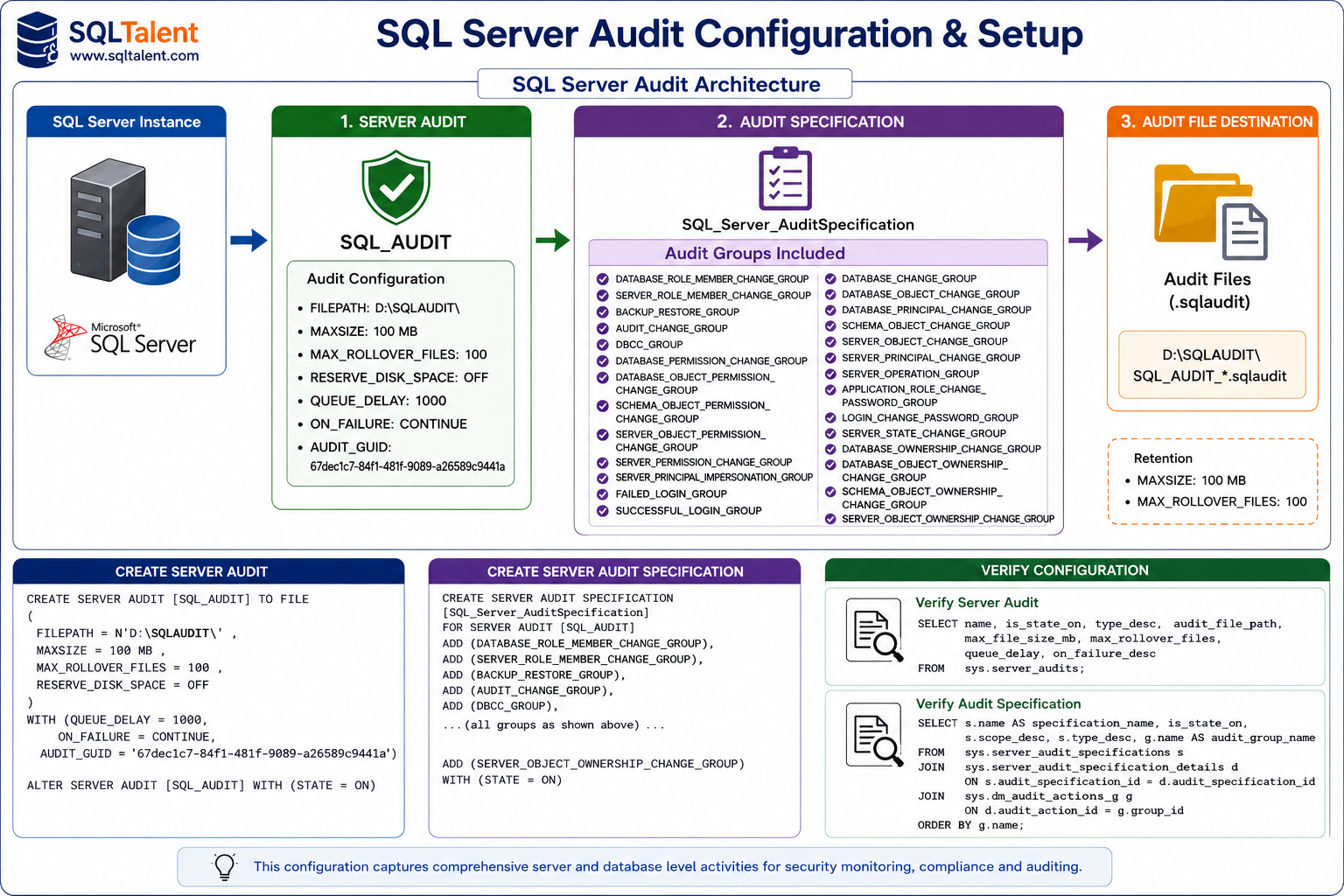
Audit Configuration
Server Audit Configuration
| Setting | Value | Description |
|---|---|---|
| Audit Name | SQL_AUDIT | Server Audit Object |
| Audit Destination | FILE | Audit records stored in files |
| Audit Path | D:\SQLAUDIT\ | Audit file storage location |
| Max File Size | 100 MB | Maximum size per audit file |
| Max Rollover Files | 100 | Number of retained audit files |
| Reserve Disk Space | OFF | Space allocated dynamically |
| Queue Delay | 1000 ms | Audit write delay |
| On Failure | CONTINUE | SQL Server continues processing if audit write fails |
| Status | Enabled | Audit collection active |
Audit Groups Monitored
Security and Privileged Access Monitoring
| Audit Group | Description | Example Activity |
|---|---|---|
| SERVER_PRINCIPAL_CHANGE_GROUP | Monitors login creation, modification, and deletion | CREATE LOGIN, ALTER LOGIN, DROP LOGIN |
| SERVER_ROLE_MEMBER_CHANGE_GROUP | Monitors server role membership changes | Add user to sysadmin |
| DATABASE_ROLE_MEMBER_CHANGE_GROUP | Monitors database role membership changes | Add user to db_owner |
| SERVER_PERMISSION_CHANGE_GROUP | Monitors server-level permission changes | GRANT VIEW SERVER STATE |
| SERVER_OBJECT_PERMISSION_CHANGE_GROUP | Monitors server object permission changes | GRANT ALTER ANY LOGIN |
| DATABASE_PERMISSION_CHANGE_GROUP | Monitors database permissions | GRANT CONNECT |
| DATABASE_OBJECT_PERMISSION_CHANGE_GROUP | Monitors table and view permissions | GRANT SELECT ON TABLE |
| SCHEMA_OBJECT_PERMISSION_CHANGE_GROUP | Monitors schema permissions | GRANT ALTER ON SCHEMA |
| SERVER_PRINCIPAL_IMPERSONATION_GROUP | Monitors login impersonation | EXECUTE AS LOGIN |
Login Monitoring
| Audit Group | Description | Example Activity |
|---|---|---|
| SUCCESSFUL_LOGIN_GROUP | Tracks successful login attempts | SSMS Login |
| FAILED_LOGIN_GROUP | Tracks failed login attempts | Invalid password attempt |
| LOGIN_CHANGE_PASSWORD_GROUP | Tracks SQL login password changes | ALTER LOGIN PASSWORD |
| APPLICATION_ROLE_CHANGE_PASSWORD_GROUP | Tracks application role password changes | ALTER APPLICATION ROLE |
Database Change Monitoring
| Audit Group | Description | Example Activity |
|---|---|---|
| DATABASE_CHANGE_GROUP | Database configuration changes | ALTER DATABASE |
| DATABASE_OBJECT_CHANGE_GROUP | Table changes | CREATE TABLE |
| SCHEMA_OBJECT_CHANGE_GROUP | View, Procedure, Function changes | CREATE PROCEDURE |
| DATABASE_PRINCIPAL_CHANGE_GROUP | Database user changes | CREATE USER |
Ownership Monitoring
| Audit Group | Description | Example Activity |
|---|---|---|
| DATABASE_OWNERSHIP_CHANGE_GROUP | Database owner changes | ALTER AUTHORIZATION ON DATABASE |
| DATABASE_OBJECT_OWNERSHIP_CHANGE_GROUP | Table ownership changes | ALTER AUTHORIZATION ON OBJECT |
| SCHEMA_OBJECT_OWNERSHIP_CHANGE_GROUP | Schema ownership changes | ALTER AUTHORIZATION ON SCHEMA |
| SERVER_OBJECT_OWNERSHIP_CHANGE_GROUP | Endpoint ownership changes | ALTER AUTHORIZATION ON ENDPOINT |
Operational Monitoring
| Audit Group | Description | Example Activity |
|---|---|---|
| BACKUP_RESTORE_GROUP | Backup and restore operations | BACKUP DATABASE |
| DBCC_GROUP | DBCC commands | DBCC CHECKDB |
| SERVER_OPERATION_GROUP | Server operational activities | sp_configure |
| SERVER_STATE_CHANGE_GROUP | Server/database state changes | READ_ONLY / READ_WRITE |
| SERVER_OBJECT_CHANGE_GROUP | Endpoint and server object changes | CREATE ENDPOINT |
Audit Protection Monitoring
| Audit Group | Description | Example Activity |
|---|---|---|
| AUDIT_CHANGE_GROUP | Audit configuration changes | ALTER SERVER AUDIT |
Information Captured
| Field | Description |
|---|---|
| Event Time | Date and time of activity |
| Action ID | Audit action code |
| Login Name | Login performing the activity |
| Database Name | Affected database |
| Object Name | Affected object |
| Host Name | Workstation or server name |
| Client IP | Source IP Address |
| Application Name | SSMS, SQLCMD, PowerShell, Application |
| SQL Statement | Executed T-SQL command |
| Server Instance Name | SQL Server Instance |
| Session ID | SQL Server Session |
High-Risk Activities That Generate Alerts
| Category | Event |
|---|---|
| Login Management | CREATE LOGIN |
| Login Management | ALTER LOGIN |
| Login Management | DROP LOGIN |
| Privileged Access | ALTER SERVER ROLE |
| Permission Changes | GRANT |
| Permission Changes | REVOKE |
| Permission Changes | DENY |
| User Management | CREATE USER |
| User Management | ALTER USER |
| User Management | DROP USER |
| Audit Tampering | CREATE SERVER AUDIT |
| Audit Tampering | ALTER SERVER AUDIT |
| Audit Tampering | DROP SERVER AUDIT |
| Object Deletion | DROP TABLE |
| Object Deletion | DROP VIEW |
| Object Deletion | DROP PROCEDURE |
| Object Deletion | DROP FUNCTION |
Email Alerting Architecture
The following architecture illustrates the end-to-end flow of SQL Server Audit monitoring and automated email alert generation. Audit events generated by SQL Server are written to audit files, monitored by a SQL Agent Job, and subsequently delivered to the DBA, Security, and Audit teams through Database Mail.
Process Flow:
- SQL Server generates an audit event.
- The event is recorded in the SQL Audit (.sqlaudit) files.
- A scheduled SQL Agent Job periodically reviews newly generated audit records.
- High-risk activities such as login creation, privilege escalation, permission changes, and audit modifications are identified.
- Database Mail generates an HTML-formatted alert notification.
- Email notifications are delivered to DBA, Security, Audit, and Compliance teams for review and investigation.
Audit File Verification
The following query can be used to review and validate audit records captured by SQL Server Audit. It retrieves audit events from the audit file repository and displays details such as event time, action performed, login account, host name, application name, and executed SQL statement.
SELECT
    event_time,
    action_id,
    session_server_principal_name,
    database_name,
    object_name,
    host_name,
    application_name,
    statement
FROM sys.fn_get_audit_file
(
    'D:\SQLAUDIT\SQL_AUDIT_*.sqlaudit',
    DEFAULT,
    DEFAULT
)
ORDER BY event_time DESC;
1. SQL Server Generates an Audit Event
Demo Script
USE master;
GO

CREATE LOGIN AuditDemoUser
WITH PASSWORD = 'Password@123';
GO
Audit Group Triggered
2. Event is Recorded in SQL Audit (.sqlaudit) Files
Verify Audit Configuration
SELECT
    name,
    type_desc,
    audit_file_path,
    max_file_size,
    max_rollover_files,
    queue_delay,
    on_failure_desc
FROM sys.server_audits;
GO
Verify Audit Files
SELECT
    event_time,
    action_id,
    session_server_principal_name,
    statement
FROM sys.fn_get_audit_file
(
    'D:\SQLAUDIT\SQL_AUDIT_*.sqlaudit',
    DEFAULT,
    DEFAULT
)
ORDER BY event_time DESC;
GO
3. SQL Agent Job Reviews Audit Records
SELECT
    event_time,
    action_id,
    session_server_principal_name,
    host_name,
    statement
FROM sys.fn_get_audit_file
(
    'D:\SQLAUDIT\SQL_AUDIT_*.sqlaudit',
    DEFAULT,
    DEFAULT
)
WHERE event_time >= DATEADD(MINUTE,-5,GETDATE())
ORDER BY event_time DESC;
GO
Frequency: Every 5 Minutes
Owner: SQL DBA Team
4. High-Risk Activities Are Identified
ALTER SERVER ROLE sysadmin
ADD MEMBER AuditDemoUser;
GO

GRANT CONTROL SERVER
TO AuditDemoUser;
GO
5. Database Mail Generates an Alert
EXEC msdb.dbo.sp_send_dbmail
    @profile_name = 'SQLDBAActivity',
    @recipients = 'dba@company.com',
    @subject = 'SQL Audit Test Alert',
    @body = 'Database Mail Test Successful';
GO
6. Email Delivered to DBA, Security, Audit and Compliance Teams
| Recipient Type | Purpose |
|---|---|
| To | DBA Team |
| CC | Security Team |
| CC | Audit Team |
| BCC | SOC Team |
| BCC | Compliance Team |
Example Subject
Benefits
| Benefit | Description |
|---|---|
| Security Monitoring | Detects privileged activities in near real time. |
| Compliance | Supports audit, regulatory, and governance requirements. |
| Accountability | Tracks who performed what activity, when it occurred, and from where. |
| Forensic Investigation | Provides historical audit records to support investigations and root cause analysis. |
| Audit Protection | Detects modifications to audit configurations and potential audit tampering attempts. |
| Privileged Access Governance | Monitors sysadmin role assignments, login changes, and elevated privilege activities. |
| Database Change Tracking | Monitors schema modifications, object changes, and permission changes across databases. |
| Centralized Monitoring | Can be integrated with SIEM platforms such as Splunk, QRadar, Sentinel, and ArcSight. |
SQL Server audit and alerting architecture
Conclusion
SQL Server Audit provides a robust and tamper-resistant auditing framework for monitoring privileged access, security changes, database modifications, permission changes, login activity, backup operations, and audit configuration changes. When combined with Database Mail alerts or SIEM integration, organizations gain real-time visibility into critical activities, improving security governance, compliance posture, and operational oversight across SQL Server environments.
