
SQL Server Audit and Security Alerting for Privileged Login Activities
Purpose
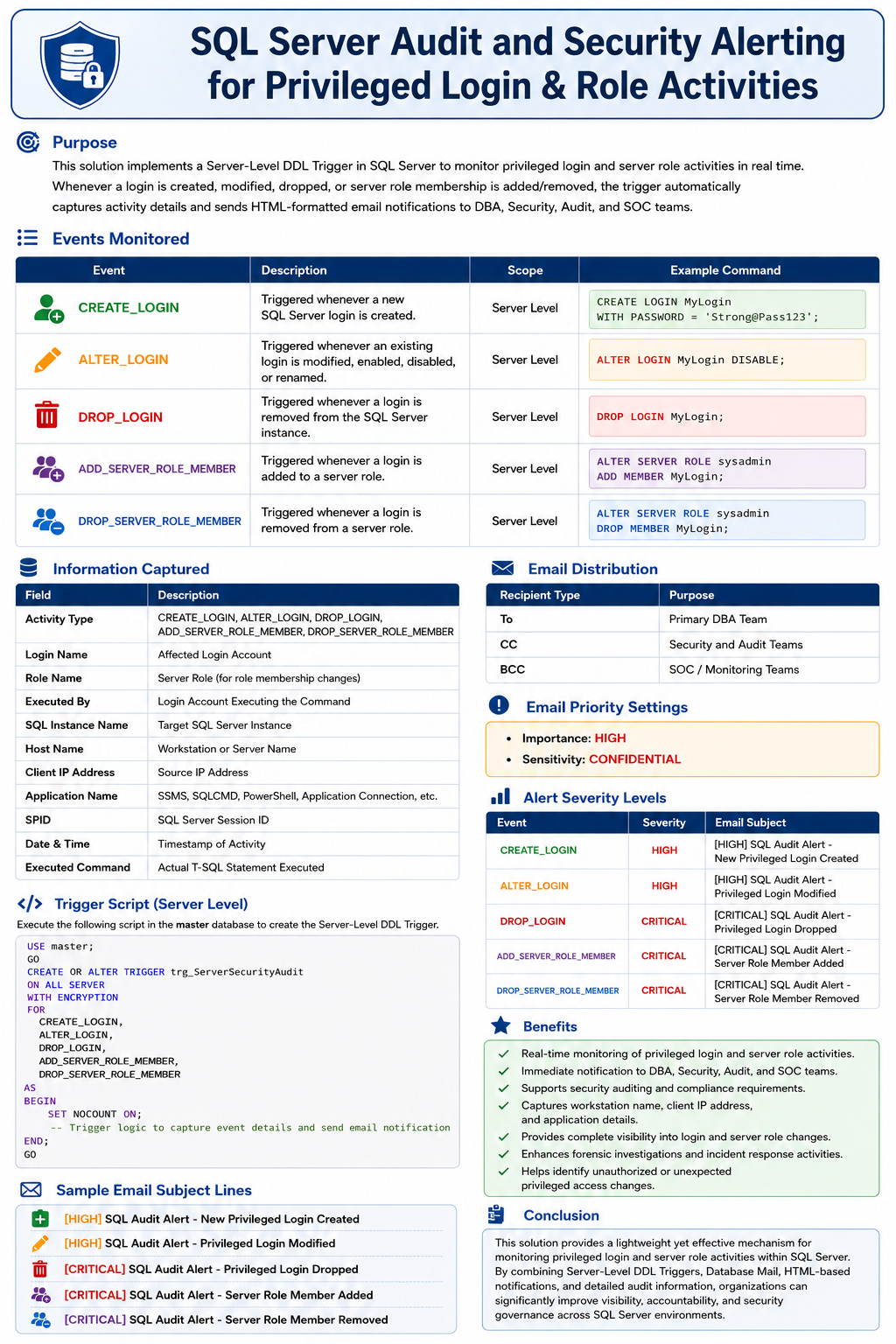
This solution implements a Server-Level DDL Trigger in SQL Server to monitor privileged login-related activities in real time. Whenever a login is created, modified, or dropped, the trigger automatically captures activity details and sends HTML-formatted email notifications to DBA, Security, Audit, and SOC teams.
The solution enhances security monitoring, strengthens audit controls, and provides immediate visibility into privileged access changes within SQL Server.
Events Monitored
| Event | Description |
|---|---|
| CREATE_LOGIN | Triggered whenever a new SQL Server login is created. |
| ALTER_LOGIN | Triggered whenever an existing login is modified, enabled, disabled, or renamed. |
| DROP_LOGIN | Triggered whenever a login is removed from the SQL Server instance. |
| ADD_SERVER_ROLE_MEMBER | Triggered whenever a login is added to a SQL Server fixed or user-defined server role such as sysadmin, securityadmin, serveradmin, setupadmin, processadmin, diskadmin, dbcreator, or bulkadmin. |
| DROP_SERVER_ROLE_MEMBER | Triggered whenever a login is removed from a SQL Server fixed or user-defined server role, resulting in a reduction or removal of server-level privileges. |
Trigger Security
The trigger is created using WITH ENCRYPTION, preventing users from viewing the source code through OBJECT_DEFINITION(), sp_helptext, or system catalog views.
Information Captured
| Field | Description |
|---|---|
| Activity Type | CREATE_LOGIN, ALTER_LOGIN, DROP_LOGIN |
| Login Name | Affected Login Account |
| Executed By | Login Account Executing the Command |
| SQL Instance Name | Target SQL Server Instance |
| Host Name | Workstation or Server Name |
| Client IP Address | Source IP Address |
| Application Name | SSMS, SQLCMD, PowerShell, Application Connection, etc. |
| SPID | SQL Server Session ID |
| Date & Time | Timestamp of Activity |
| Executed Command | Actual T-SQL Statement Executed |
Email Notification Process
When a login-related event occurs, the trigger generates an HTML email containing complete audit information including login details, source workstation, IP address, application name, execution account, and the T-SQL command executed.
Email Distribution
| Recipient Type | Purpose |
|---|---|
| To | Primary DBA Team |
| CC | Security and Audit Teams |
| BCC | SOC / Monitoring Teams |
Email Priority Settings
- Importance: HIGH
- Sensitivity: CONFIDENTIAL
Alert Severity Levels
| Event | Severity | Email Subject |
|---|---|---|
| CREATE_LOGIN | HIGH | [HIGH] SQL Audit Alert – New Privileged Login Created |
| ALTER_LOGIN | HIGH | [HIGH] SQL Audit Alert – Privileged Login Modified |
| DROP_LOGIN | CRITICAL | [CRITICAL] SQL Audit Alert – Privileged Login Dropped |
Trigger Script
Execute the following script in the master database to create the Server-Level DDL Trigger.
USE master;
GO
CREATE OR ALTER TRIGGER trg_ServerLoginAudit
ON ALL SERVER
FOR
CREATE_LOGIN,
ALTER_LOGIN,
DROP_LOGIN,
ADD_SERVER_ROLE_MEMBER,
DROP_SERVER_ROLE_MEMBER
AS
BEGIN
SET NOCOUNT ON;
DECLARE @EventType NVARCHAR(100);
DECLARE @LoginName SYSNAME;
DECLARE @CreatedBy SYSNAME;
DECLARE @HostName NVARCHAR(128);
DECLARE @ProgramName NVARCHAR(256);
DECLARE @ClientIP NVARCHAR(50);
DECLARE @SPID INT;
DECLARE @ServerName SYSNAME;
DECLARE @InstanceName NVARCHAR(128);
DECLARE @Subject NVARCHAR(500);
DECLARE @Body NVARCHAR(MAX);
DECLARE @CommandText NVARCHAR(MAX);
DECLARE @RoleName SYSNAME;
SET @InstanceName = @@SERVERNAME;
SET @ServerName = @@SERVERNAME;
/* Event Information */
SET @EventType = EVENTDATA().value(
‘(/EVENT_INSTANCE/EventType)[1]’,
‘NVARCHAR(100)’);
SET @LoginName = EVENTDATA().value(
‘(/EVENT_INSTANCE/ObjectName)[1]’,
‘SYSNAME’);
SET @CommandText =
EVENTDATA().value(
‘(/EVENT_INSTANCE/TSQLCommand/CommandText)[1]’,
‘NVARCHAR(MAX)’);
SET @RoleName = EVENTDATA().value(
‘(/EVENT_INSTANCE/RoleName)[1]’,
‘SYSNAME’);
/* Login executing the command */
SET @CreatedBy = ORIGINAL_LOGIN();
/* Session Information */
SELECT
@HostName = s.host_name,
@ProgramName = s.program_name,
@ClientIP = c.client_net_address,
@SPID = s.session_id
FROM sys.dm_exec_sessions s
LEFT JOIN sys.dm_exec_connections c
ON s.session_id = c.session_id
WHERE s.session_id = @@SPID;
/* Subject Based on Activity */
IF @EventType = ‘CREATE_LOGIN’
BEGIN
SET @Subject =
‘[HIGH] SQL Audit Alert – New Privileged Login Created | Server : ‘
+ @InstanceName;
END
ELSE IF @EventType = ‘ALTER_LOGIN’
BEGIN
SET @Subject =
‘[HIGH] SQL Audit Alert – Privileged Login Modified | Server : ‘
+ @InstanceName;
END
ELSE IF @EventType = ‘DROP_LOGIN’
BEGIN
SET @Subject =
‘[CRITICAL] SQL Audit Alert – Privileged Login Dropped | Server : ‘
+ @InstanceName;
END
ELSE IF @EventType = ‘ADD_SERVER_ROLE_MEMBER’
BEGIN
SET @Subject =
‘[CRITICAL] SQL Audit Alert – Server Role Membership Added | Server : ‘
+ @InstanceName;
END
ELSE IF @EventType = ‘DROP_SERVER_ROLE_MEMBER’
BEGIN
SET @Subject =
‘[CRITICAL] SQL Audit Alert – Server Role Membership Removed | Server : ‘
+ @InstanceName;
END
ELSE
BEGIN
SET @Subject =
‘[INFO] SQL Audit Alert – Login Activity Detected | Server : ‘
+ @InstanceName;
END
/* HTML Email Body */
SET @Body = N’
<html>
<head>
<style>
body
{
font-family: Calibri, Arial, sans-serif;
font-size: 11pt;
color: #000000;
}
.header
{
background-color:#1F4E78;
color:white;
padding:15px;
font-size:20px;
font-weight:bold;
}
table
{
border-collapse:collapse;
width:90%;
margin-top:10px;
}
th
{
background-color:#D9EAF7;
border:1px solid #BFBFBF;
text-align:left;
padding:8px;
width:35%;
}
td
{
border:1px solid #BFBFBF;
padding:8px;
}
.footer
{
margin-top:15px;
font-size:10pt;
color:#666666;
}
.command
{
margin-top:15px;
padding:10px;
border:1px solid #BFBFBF;
background-color:#F7F7F7;
font-family:Consolas;
white-space:pre-wrap;
}
</style>
</head>
<body>
<div class=”header”>SQL Server Privileged Activity Alert</div>
<p>A privileged login or server role activity has been detected on the SQL Server instance.</p>
<table>
<tr><th>Activity</th><td>’ + ISNULL(@EventType,’N/A’) + ‘</td></tr>
<tr><th>Login Name</th><td>’ + ISNULL(@LoginName,’N/A’) + ‘</td></tr>
<tr><th>Server Role</th><td>’ + ISNULL(@RoleName,’N/A’) + ‘</td></tr>
<tr><th>Executed By</th><td>’ + ISNULL(@CreatedBy,’N/A’) + ‘</td></tr>
<tr><th>SQL Instance Name</th><td>’ + ISNULL(@ServerName,’N/A’) + ‘</td></tr>
<tr><th>Host Name</th><td>’ + ISNULL(@HostName,’N/A’) + ‘</td></tr>
<tr><th>Client IP Address</th><td>’ + ISNULL(@ClientIP,’N/A’) + ‘</td></tr>
<tr><th>Application Name</th><td>’ + ISNULL(@ProgramName,’N/A’) + ‘</td></tr>
<tr><th>SPID</th><td>’ + CAST(ISNULL(@SPID,0) AS VARCHAR(20)) + ‘</td></tr>
<tr><th>Date & Time</th><td>’ + CONVERT(VARCHAR(30), GETDATE(), 120) + ‘</td></tr>
</table>
<h3>Executed Command</h3>
<div class=”command”>’
+ REPLACE(ISNULL(@CommandText,’N/A’),'<‘,’<’)
+ ‘</div>
<div class=”footer”>
This is an automated SQL Server Audit Notification generated by a Server-Level DDL Trigger.
</div>
</body>
</html>’;
/* Send Email */
Benefits
- Real-time monitoring of privileged login activities.
- Immediate notification to DBA, Security, Audit, and SOC teams.
- Supports security auditing and compliance requirements.
- Captures workstation name, client IP address, and application details.
- Provides complete visibility into login-related changes.
- Enhances forensic investigations and incident response activities.
- Helps identify unauthorized or unexpected privileged access changes.
Sample Email Subject Lines
[HIGH] SQL Audit Alert – New Privileged Login Created
[HIGH] SQL Audit Alert – Privileged Login Modified
[CRITICAL] SQL Audit Alert – Privileged Login Dropped
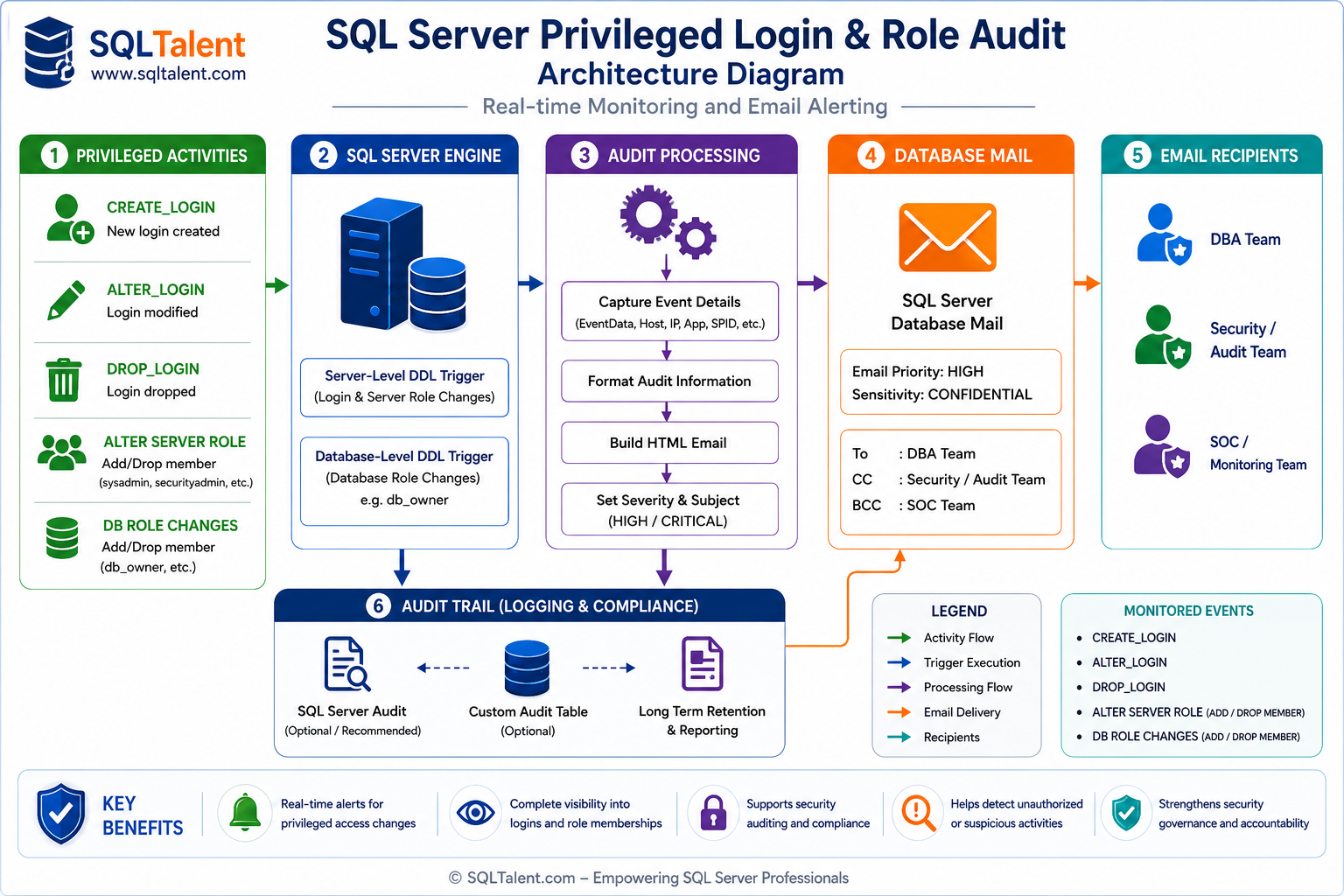
Architecture Diagram of SQL Login Alerts
SQL Server audit and alerting architecture
Conclusion
This solution provides a lightweight yet effective mechanism for monitoring privileged login activities within SQL Server. By combining Server-Level DDL Triggers, Database Mail, HTML-based notifications, and detailed audit information, organizations can significantly improve visibility, accountability, and security governance across SQL Server environments.
