
Overview
Instant File Initialization (IFI) is one of the simplest and most impactful performance optimizations available in SQL Server. When enabled, SQL Server can allocate database file space immediately without waiting for Windows to zero-initialize newly allocated data file space.
This significantly reduces:
- Database creation time
- Database restore duration
- Data file growth events
- Database recovery operations
- Storage-related latency during workload spikes
For large databases, enabling IFI can reduce file allocation operations from several minutes to only a few seconds.
What is Instant File Initialization?
By default, whenever SQL Server creates or expands a database file, Windows performs a security operation known as zero initialization.
During this process:
- Windows writes zeros to every allocated block.
- SQL Server waits until the operation completes.
- The file becomes available only after initialization finishes.
For large files, this can consume substantial time and I/O resources.
With Instant File Initialization enabled, Windows skips the zeroing operation for SQL Server data files, allowing SQL Server to immediately use the allocated space.
How IFI Works
Without IFI (Default Behavior)
File Growth Request
        ↓
Windows Zeroes Entire Space
        ↓
SQL Server Waits
        ↓
Space Becomes Available
Result
- Slower restores
- Slower file growth
- Increased I/O latency
- Potential application slowdowns
With IFI Enabled
File Growth Request
        ↓
Windows Skips Zeroing
        ↓
SQL Server Uses Space Immediately
Result
- Faster restores
- Faster autogrowth
- Reduced storage overhead
- Improved responsiveness
Which Files Benefit from IFI?
| File Type | Extension | IFI Applies? |
|---|---|---|
| Data File | .mdf |
✅ Yes |
| Secondary Data File | .ndf |
✅ Yes |
| TempDB Data File | .mdf / .ndf |
✅ Yes |
| Transaction Log File | .ldf |
❌ No* |
Note: Instant File Initialization (IFI) applies only to SQL Server data files (.mdf and .ndf). Transaction log files (.ldf) always require zero initialization for crash recovery and data integrity purposes. SQL Server 2022 improves log growth performance for smaller increments, but IFI still does not apply to log files.
SQL Server 2022 Enhancement
Starting with SQL Server 2022, Microsoft introduced improvements for transaction log growth operations.
Improvements
- Log autogrowth up to approximately 64 MB is significantly faster
- Reduced overhead for frequent log growth events
- Better transaction log responsiveness
Important
Even in SQL Server 2022:
Transaction log files still require initialization and do not fully benefit from Instant File Initialization.
Benefits of IFI
1. Faster Database Restores
Large databases can be restored much faster because SQL Server does not wait for data files to be initialized.
Example:
| Database Size | Without IFI | With IFI |
|---|---|---|
| 500 GB | Several Minutes | Seconds |
| 1 TB | Tens of Minutes | Seconds |
2. Faster Autogrowth Events
When data files grow automatically:
- Less blocking
- Lower I/O spikes
- Better application response times
3. Improved TempDB Performance
TempDB is recreated every SQL Server restart.
IFI significantly reduces:
- SQL startup time
- TempDB initialization time
4. Reduced Wait Statistics
Without IFI, DBAs may observe waits such as:
PREEMPTIVE_OS_WRITEFILEGATHEREnabling IFI helps reduce these waits during file allocation operations.
Prerequisites
Before enabling IFI, verify the following:
1. Windows Administrator Access
You must have rights to modify:
Local Security Policyor
Group Policy2. SQL Server Service Account
Identify the SQL Server service account:
Script:
SELECT servicename service_account FROM sys.dm_server_services;
GO
3. Perform Volume Maintenance Tasks Privilege
The SQL Server service account requires the Windows privilege:
Perform Volume Maintenance TasksWindows Security Policy Name:
SeManageVolumePrivilegeHow to Enable IFI
Method 1: Local Security Policy
Open:
secpol.mscNavigate:
Local Policies
 └─ User Rights Assignment
      └─ Perform Volume Maintenance Tasks
Add:
SQL Server Service AccountExample:
DOMAIN\sqlsvcRestart SQL Server service after applying the change.
Method 2: Group Policy (Recommended for Enterprises)
Use Group Policy Management:
Computer Configuration
 └─ Windows Settings
      └─ Security Settings
           └─ User Rights Assignment
                └─ Perform Volume Maintenance Tasks
Add SQL Service Accounts.
Configuration Validation Queries
Check IFI Status (SQL Server 2016 SP1+)
Script:
SELECT SERVERPROPERTY(‘InstantFileInitializationEnabled’) AS IFI_Enabled;
GO
Output
| Value | Meaning |
|---|---|
| 1 | ✅ Enabled |
| 0 | ❌ Disabled* |
Check SQL Service Account
Script:
SELECT servicename, startup_type_desc, service_account FROM sys.dm_server_services;
Check SQL Version
SELECT @@VERSION;
GO
Troubleshooting Queries
Verify IFI Status
SELECT SERVERPROPERTY(‘InstantFileInitializationEnabled’) AS IFI_Status;
Check Startup Messages
SQL Server records IFI status during startup.
EXEC xp_readerrorlog
     0,
     1,
     N'Database Instant File Initialization';
GO
Expected:
Database Instant File Initialization: enabledSearch SQL Error Log
EXEC xp_readerrorlog
     0,
     1,
     N'Instant File Initialization';
GO
Review File Growth Events
SELECT DatabaseName,FileName, StartTime,Duration FROM fn_trace_gettable
( CONVERT(VARCHAR(500),
(SELECT path FROM sys.traces WHERE is_default = 1)), DEFAULT )
WHERE EventClass IN (92,93) ORDER BY StartTime DESC;
GO
Check Wait Statistics
SELECT wait_type, waiting_tasks_count, wait_time_ms
FROM sys.dm_os_wait_stats
WHERE wait_type LIKE ‘PREEMPTIVE_OS%’
ORDER BY wait_time_ms DESC;
GO
Verify Service Account Privilege
From PowerShell:
whoami /privLook for:
SeManageVolumePrivilegeStatus:
EnabledSecurity Considerations
While IFI improves performance, it introduces a minor security consideration.
Why?
Without IFI:
- Windows overwrites allocated space with zeros.
With IFI:
- Previously used disk blocks are allocated immediately.
This means residual data could theoretically remain on disk until overwritten.
Microsoft Guidance
Microsoft considers IFI safe for most production environments.
However, highly regulated environments may require:
- Full disk encryption
- BitLocker
- SAN encryption
- Storage-level security controls
Recommended Security Controls
Enable BitLocker
Protects data at rest.
Restrict Local Administrator Access
Prevents unauthorized disk-level access.
Use Dedicated Database Volumes
Separate database storage from application storage.
Follow Least Privilege
Grant only:
Perform Volume Maintenance TasksBest Practices
1. Enable IFI on All SQL Servers
Recommended for:
- Production
- DR
- UAT
- Development
2. Pre-Size Database Files
Avoid excessive autogrowth.
Example:
MODIFY FILE
(
NAME = MyDB_Data,
SIZE = 100GB
);
3. Configure Fixed Autogrowth
Avoid percentage growth.
Recommended:
| Database Size | Growth |
|---|---|
| <100 GB | 512 MB |
| 100-500 GB | 1 GB |
| >500 GB | 2-4 GB |
4. Monitor File Growth Events
Capture:
- Event ID 92
- Event ID 93
- Default Trace
- Extended Events
5. Verify After Every SQL Installation
Include IFI validation in:
- Build Checklists
- SQL Health Checks
- DR Readiness Reviews
6. Enable IFI Before Large Restores
Particularly important when restoring:
- Data Warehouse databases
- Archive databases
- Multi-TB OLTP systems
7. Configure TempDB Correctly
IFI complements TempDB best practices:
- Multiple data files
- Equal sizing
- Fixed autogrowth
Common DBA Health Check Script
SELECT
@@SERVERNAME AS ServerName,
SERVERPROPERTY(‘ProductVersion’) AS ProductVersion,
SERVERPROPERTY(‘Edition’) AS Edition,
SERVERPROPERTY(‘InstantFileInitializationEnabled’)
AS IFI_Enabled;
Frequently Asked Questions
Does IFI improve transaction log growth?
No.
Transaction log files still require initialization.
SQL Server 2022 only optimizes smaller log growth operations.
Does IFI require SQL Server restart?
Yes.
After granting the Windows privilege, restart the SQL Server service.
Does IFI improve backups?
No.
It improves:
- Restores
- File creation
- File growth
Not backup speed itself.
Is IFI enabled by default?
No.
The required Windows privilege must be granted to the SQL Server service account.
| SQL Server Instant File Initialization Diagram |
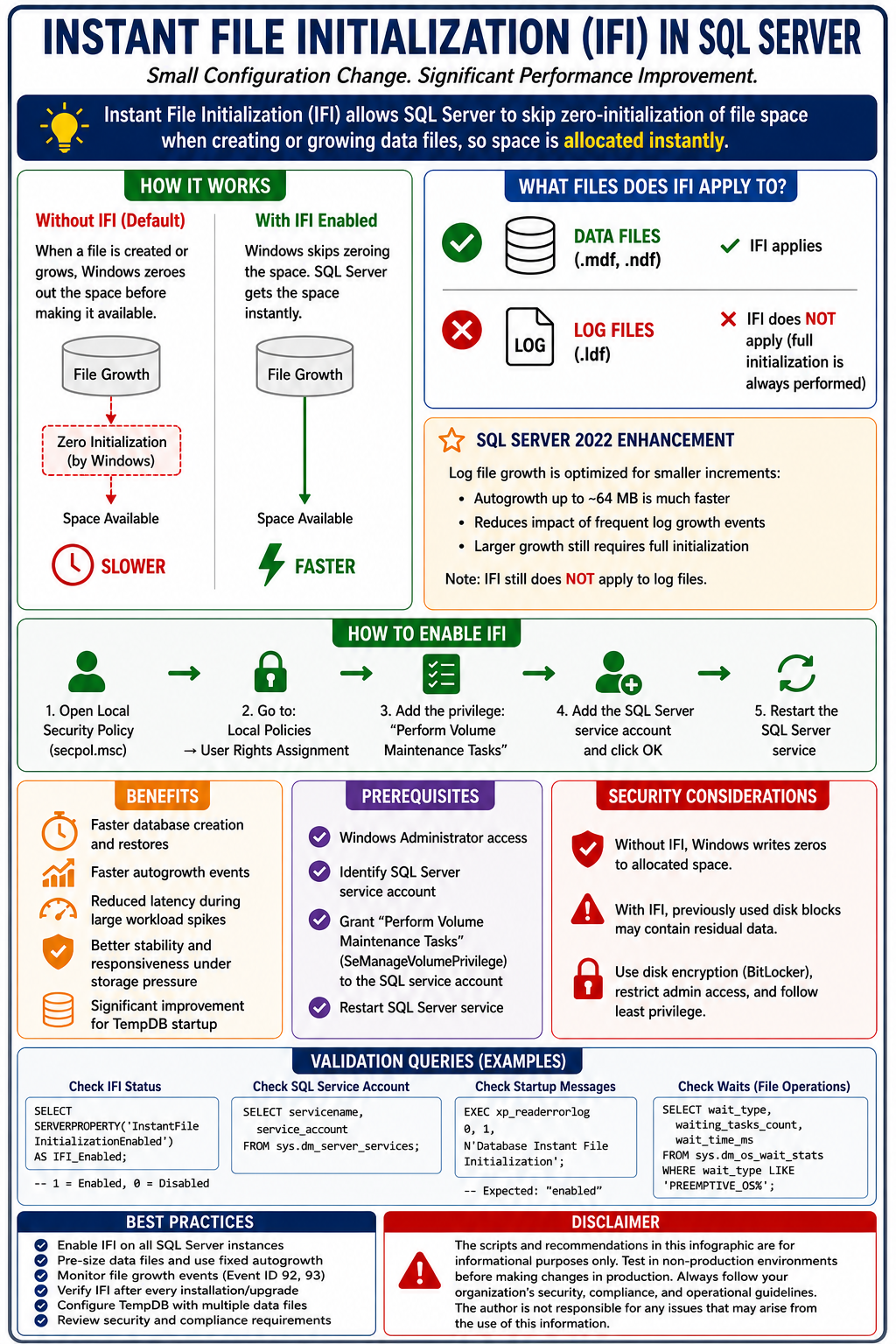 |
Disclaimer
The scripts and recommendations provided in this article are intended for educational and operational guidance purposes only. Always validate changes in a non-production environment before implementing them in production. Security, compliance, storage architecture, and organizational policies should be reviewed prior to enabling Instant File Initialization. SQLTalent.com and the author assume no responsibility for data loss, downtime, performance issues, or security implications resulting from the use of these scripts or procedures.
Conclusion
Instant File Initialization (IFI) is one of the highest-value, lowest-effort SQL Server performance optimizations available. By granting the Perform Volume Maintenance Tasks privilege to the SQL Server service account, organizations can dramatically reduce database restore times, data file growth delays, TempDB initialization overhead, and storage-related performance bottlenecks.
For most SQL Server environments, enabling IFI should be considered a standard DBA best practice and included as part of every server build, migration, upgrade, and health check process.
