Although SQL Server Database Mirroring has been deprecated in favor of Always On Availability Groups (AG), it remains a fully supported feature in SQL Server 2022 and continues to run many mission-critical production systems worldwide.
This often creates confusion among DBAs:
“If Database Mirroring is deprecated, why is it still available in SQL Server 2022? Should we continue using it?”
The answer is Yes—for existing environments. No—for new deployments.
Let’s understand why.
What Does “Deprecated” Really Mean?
Many professionals assume that deprecated means unsupported. That is not correct.
A deprecated feature means:
- ✅ It is still supported by Microsoft.
- ✅ It continues to receive support as part of the SQL Server product lifecycle.
- ✅ Existing environments can continue using it safely.
- ⚠️ Microsoft recommends not using it for new implementations.
- ⚠️ It may be removed in a future SQL Server release.
As of SQL Server 2022, Database Mirroring is still fully functional and supported.
Why Has Microsoft Not Removed It?
Thousands of organizations—including banks, healthcare providers, insurance companies, and government agencies—still rely on Database Mirroring for high availability.
Removing it abruptly would impact countless production environments.
Instead, Microsoft follows a gradual lifecycle:
- Introduce a better technology (Always On Availability Groups).
- Mark the older feature as deprecated.
- Continue supporting it for existing customers.
- Remove it only in a future release after customers have had sufficient time to migrate.
This approach protects existing investments while encouraging modernization.
Should We Continue Using Database Mirroring?
Existing Production Environments
Yes.
If your organization already uses Database Mirroring and it meets your business requirements:
- Continue using it.
- Monitor synchronization regularly.
- Maintain endpoint health.
- Include it in your disaster recovery testing.
- Plan a migration as part of your long-term roadmap.
There is no requirement to replace a stable Database Mirroring environment simply because it is deprecated.
Many organizations continue running Database Mirroring successfully after more than a decade.
New Projects
For new SQL Server deployments, Microsoft recommends:
SQL Server Enterprise Edition
Use Always On Availability Groups.
Benefits include:
- Multiple secondary replicas
- Readable secondary databases
- Backup offloading
- Availability Group Listener
- Better scalability
- Group failover for multiple databases
- Active Microsoft investment and long-term support
SQL Server Standard Edition
If Enterprise Edition is not available, consider Basic Availability Groups, keeping in mind their feature limitations.
Database Mirroring Architecture
Database Mirroring consists of:
- Principal Server
- Mirror Server
- Witness Server (Optional)
In High Safety Mode with a Witness, automatic failover is supported.
Transaction Log records are continuously sent from the Principal database to the Mirror database to maintain synchronization.
Useful Monitoring Queries
1. Check Database Mirroring Status
SELECT DB_NAME(database_id) AS DatabaseName,
mirroring_role_desc,mirroring_state_desc,
mirroring_safety_level_desc, mirroring_partner_name
FROM sys.database_mirroring WHERE mirroring_guid IS NOT NULL;
2. Check Synchronization Status
SELECT d.name AS DatabaseName, dm.mirroring_state_desc,
dm.mirroring_role_desc, dm.mirroring_partner_name
FROM sys.databases d JOIN sys.database_mirroring dm
ON d.database_id = dm.database_id
WHERE dm.mirroring_guid IS NOT NULL;
3. Verify Mirroring Endpoints
SELECT name, state_desc, role_desc,
port, connection_auth_desc, encryption_algorithm_desc
FROM sys.database_mirroring_endpoints;
4. Monitor Send and Redo Queues
SELECT DB_NAME(database_id) AS DatabaseName,
mirroring_send_queue,mirroring_redo_queue
FROM sys.database_mirroring WHERE mirroring_guid IS NOT NULL;
Large queue values may indicate synchronization delays or network bottlenecks.
5. Verify Witness Status
SELECT DB_NAME(database_id) AS DatabaseName, mirroring_witness_name,
mirroring_witness_state_desc
FROM sys.database_mirroring WHERE mirroring_guid IS NOT NULL;
Implementation Validation Summary
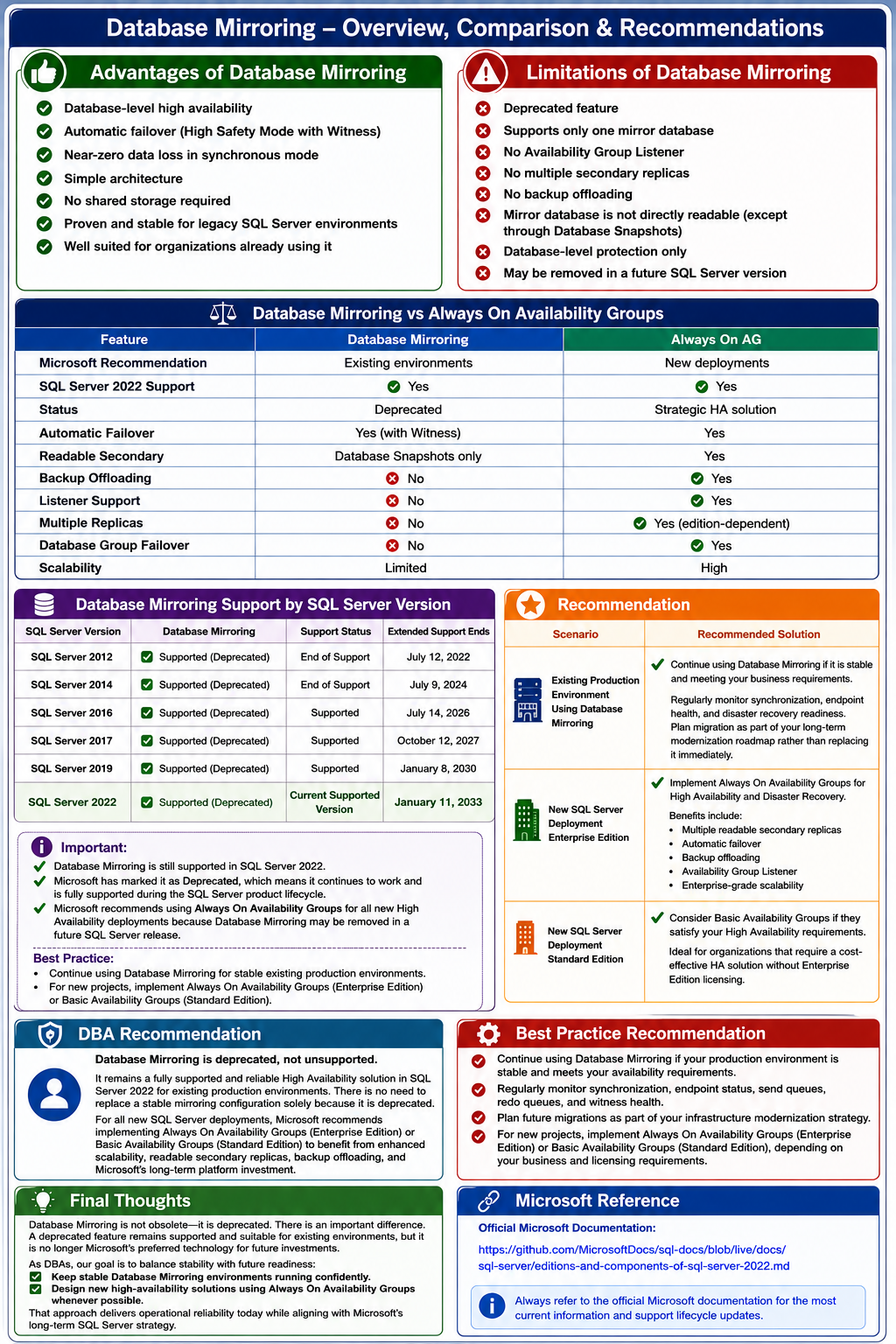
Advantages of Database Mirroring
- Database-level high availability
- Automatic failover (High Safety Mode with Witness)
- Near-zero data loss in synchronous mode
- Simple architecture
- No shared storage required
- Proven and stable for legacy SQL Server environments
- Well suited for organizations already using it
Limitations
- Deprecated feature
- Supports only one mirror database
- No Availability Group Listener
- No multiple secondary replicas
- No backup offloading
- Mirror database is not directly readable (except through Database Snapshots)
- Database-level protection only
- May be removed in a future SQL Server version
Database Mirroring vs Always On Availability Groups
| Feature | Database Mirroring | Always On AG |
|---|---|---|
| Microsoft Recommendation | Existing environments | New deployments |
| SQL Server 2022 Support | ✅ Yes | ✅ Yes |
| Status | Deprecated | Strategic HA solution |
| Automatic Failover | Yes (with Witness) | Yes |
| Readable Secondary | Database Snapshots only | Yes |
| Backup Offloading | No | Yes |
| Listener Support | No | Yes |
| Multiple Replicas | No | Yes (edition-dependent) |
| Database Group Failover | No | Yes |
| Scalability | Limited | High |
Database Mirroring Support by SQL Server Version
| SQL Server Version | Database Mirroring | Support Status | Extended Support Ends |
|---|---|---|---|
| SQL Server 2012 | ✅ Supported (Deprecated) | End of Support | July 12, 2022 |
| SQL Server 2014 | ✅ Supported (Deprecated) | End of Support | July 9, 2024 |
| SQL Server 2016 | ✅ Supported (Deprecated) | Supported | July 14, 2026 |
| SQL Server 2017 | ✅ Supported (Deprecated) | Supported | October 12, 2027 |
| SQL Server 2019 | ✅ Supported (Deprecated) | Supported | January 8, 2030 |
| SQL Server 2022 | ✅ Supported (Deprecated) | Current Supported Version | January 11, 2033 |
Important:
✔ Database Mirroring is still supported in SQL Server 2022.
✔ Microsoft has marked it as Deprecated, which means it continues to work and is fully supported during the SQL Server product lifecycle.
✔ Microsoft recommends using Always On Availability Groups for all new High Availability deployments because Database Mirroring may be removed in a future SQL Server release.
Best Practice:
• Continue using Database Mirroring for stable existing production environments.
• For new projects, implement Always On Availability Groups (Enterprise Edition) or Basic Availability Groups (Standard Edition).
Microsoft Reference: sql-docs/docs/sql-server/editions-and-components-of-sql-server-2022.md at live · MicrosoftDocs/sql-docs · GitHub
Recommendation
DBA Recommendation
Database Mirroring is deprecated, not unsupported.
It remains a fully supported and reliable High Availability solution in SQL Server 2022 for existing production environments. There is no need to replace a stable mirroring configuration solely because it is deprecated.
For all new SQL Server deployments, Microsoft recommends implementing Always On Availability Groups (Enterprise Edition) or Basic Availability Groups (Standard Edition) to benefit from enhanced scalability, readable secondary replicas, backup offloading, and Microsoft’s long-term platform investment.
Best Practice Recommendation
✔ Continue using Database Mirroring if your production environment is stable and meets your availability requirements.
✔ Regularly monitor synchronization, endpoint status, send queues, redo queues, and witness health.
✔ Plan future migrations as part of your infrastructure modernization strategy.
✔ For new projects, implement Always On Availability Groups (Enterprise Edition) or Basic Availability Groups (Standard Edition), depending on your business and licensing requirements.
Final Thoughts
Database Mirroring is not obsolete—it is deprecated. There is an important difference.
A deprecated feature remains supported and suitable for existing environments, but it is no longer Microsoft’s preferred technology for future investments.
As DBAs, our goal is to balance stability with future readiness:
- Keep stable Database Mirroring environments running confidently.
- Design new high-availability solutions using Always On Availability Groups whenever possible.
That approach delivers operational reliability today while aligning with Microsoft’s long-term SQL Server strategy.
[sqltalent_disclaimer]
