
Transparent Data Encryption (TDE) in SQL Server: Complete DBA Guide
Transparent Data Encryption (TDE) is a SQL Server security feature that protects database files by encrypting data at rest. It helps protect sensitive information when database files, storage media, or backups are stolen or accessed outside SQL Server.
In this article, we will cover:
- What TDE is
- How TDE works
- TDE encryption architecture
- Step-by-step implementation
- Monitoring encryption status
- Certificate backup and recovery
- TDE with Always On Availability Groups
- TDE limitations and considerations
- How to disable TDE safely
- Production DBA best practices
What Is Transparent Data Encryption?
Transparent Data Encryption encrypts SQL Server database files at the storage level. The encryption and decryption processes occur automatically without requiring changes to the application.
TDE protects:
- Data files (MDF and NDF)
- Transaction log files (LDF)
- Database backups
The primary purpose of TDE is to protect data at rest.
For example, if an attacker obtains a database backup file or copies database files from the server, the encrypted files cannot be used without the required encryption keys and certificates.
What TDE Does Not Protect
It is important to understand that TDE is not a complete data security solution.
TDE does not protect data:
-
- From users who have permission to query the database
- While data is being transmitted over the network
- From SQL injection attacks
- From application-level unauthorized access
For example, if a user has permission to execute:
SELECT * FROM CustomerTDE does not prevent that user from viewing the data.
TDE protects the physical database files and backups when they are stored on disk.
How TDE Works
TDE encrypts database pages before SQL Server writes them to disk.
When SQL Server reads an encrypted page from disk, it automatically decrypts the page in memory.
The process is transparent to the application.
Application
      |
      v
SQL Server
      |
      v
Encrypted Database Files
TDE Encryption Architecture
TDE uses a hierarchy of encryption keys to protect the database encryption process.
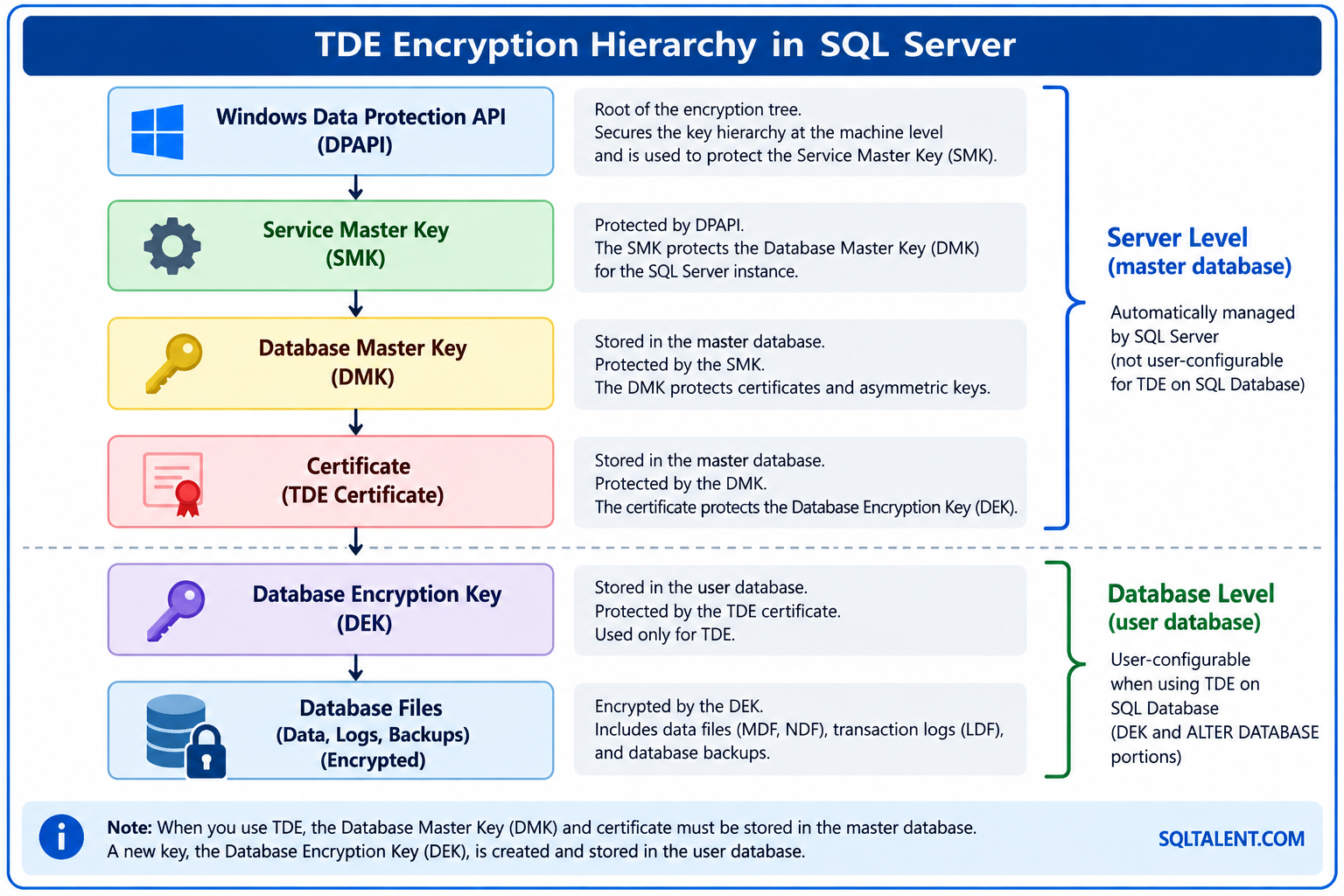
The important components for a DBA implementing TDE are:
- Windows Data Protection API (DPAPI)
- Service Master Key (SMK)
- Database Master Key (DMK)
- TDE Certificate
- Database Encryption Key (DEK)
Before Enabling TDE
Before implementing TDE in a production environment, perform the following checks.
Check SQL Server Version and Edition
SELECT
    SERVERPROPERTY('ProductVersion') AS ProductVersion,
    SERVERPROPERTY('ProductLevel') AS ProductLevel,
    SERVERPROPERTY('Edition') AS Edition;
GO
Check Existing Database Encryption
SELECT
    DB_NAME(database_id) AS DatabaseName,
    encryption_state,
    key_algorithm,
    key_length
FROM sys.dm_database_encryption_keys;
GO
TDE Encryption States
The following values are returned by the sys.dm_database_encryption_keys DMV.
| Encryption State | Description |
|---|---|
| 0 | No Database Encryption Key |
| 1 | Unencrypted |
| 2 | Encryption in Progress |
| 3 | Encrypted |
| 4 | Key Change in Progress |
| 5 | Decryption in Progress |
| 6 | Protection Change in Progress |
Step-by-Step: Enable TDE in SQL Server
The TDE implementation process consists of four main steps:
- Create a Database Master Key
- Create a Certificate
- Create a Database Encryption Key
- Enable Database Encryption
Step 1: Create the Database Master Key
The master key should be created in the master database.
USE master;
GO
CREATE MASTER KEY
ENCRYPTION BY PASSWORD = 'Use-A-Strong-Password';
GOThe password should be stored securely according to your organization’s security policy. Do not use the example password in a production environment.
Step 2: Create a TDE Certificate
Create a certificate in the master database.
USE master;
GO
CREATE CERTIFICATE TDE_Certificate
WITH SUBJECT = 'TDE Certificate for SQL Server Databases';
GO
Verify the certificate:
SELECT
    name,
    subject,
    start_date,
    expiry_date
FROM sys.certificates
WHERE name = 'TDE_Certificate';
GO
Step 3: Back Up the Certificate and Private Key
This is one of the most important steps in TDE implementation.
The certificate and private key are required when restoring or attaching a TDE-protected database on another SQL Server instance.
USE master;
GO
BACKUP CERTIFICATE TDE_Certificate
TO FILE = 'D:\TDE_Backup\TDE_Certificate.cer'
WITH PRIVATE KEY
(
FILE = 'D:\TDE_Backup\TDE_Certificate_PrivateKey.pvk',
ENCRYPTION BY PASSWORD =
'Use-A-Strong-Private-Key-Password'
);
GO
The following files must be stored securely:
TDE_Certificate.cer

TDE_Certificate_PrivateKey.pvkDo not store the certificate backup only on the SQL Server. Maintain a secure copy in an approved backup repository, secure vault, or enterprise key-management solution.
Step 4: Create the Database Encryption Key (DEK)
Connect to the database that needs to be encrypted.
Create the Database Encryption Key.
USE MyDatabase;
GO
CREATE DATABASE ENCRYPTION KEY
WITH ALGORITHM = AES_256
ENCRYPTION BY SERVER CERTIFICATE TDE_Certificate;
GO
The DEK is the key that encrypts the database files.
Step 5: Enable TDE
ALTER DATABASE MyDatabase
SET ENCRYPTION ON;
GO
SQL Server starts the encryption process in the background.
Monitor TDE Encryption Progress
SELECT
    DB_NAME(database_id) AS DatabaseName,
encryption_state,
CASE encryption_state
    WHEN 0 THEN 'No DEK'
    WHEN 1 THEN 'Unencrypted'
    WHEN 2 THEN 'Encryption in Progress'
    WHEN 3 THEN 'Encrypted'
    WHEN 4 THEN 'Key Change in Progress'
    WHEN 5 THEN 'Decryption in Progress'
    WHEN 6 THEN 'Protection Change in Progress'
    ELSE 'Unknown'
END AS EncryptionStatus,

key_algorithm,
key_length
FROM sys.dm_database_encryption_keys;
GO
Understanding the TDE Encryption Scan
When TDE is enabled, SQL Server performs an encryption scan.
- Reads database pages from the data files
- Loads the pages into the buffer pool
- Encrypts the pages
- Writes the encrypted pages back to disk
For large databases, this process can take time and consume system resources.
TDE and Database Backups
When TDE is enabled, database backups are also encrypted.
BACKUP DATABASE MyDatabase
TO DISK = 'D:\SQLBackup\MyDatabase_TDE.bak'
WITH COMPRESSION,
     STATS = 10;
GOA database backup alone is not sufficient for TDE recovery.
You must maintain the database backup, TDE certificate, and certificate private key.
Restore a TDE Database on Another SQL Server
Before restoring a TDE-encrypted database on another SQL Server, import the certificate and private key.
Step 1: Create a Master Key
USE master;
GO
CREATE MASTER KEY
ENCRYPTION BY PASSWORD =
'Use-A-Strong-Password';
GO
Step 2: Import the Certificate
USE master;
GO
CREATE CERTIFICATE TDE_Certificate
FROM FILE =
'D:\TDE_Backup\TDE_Certificate.cer'
WITH PRIVATE KEY
(
FILE =
'D:\TDE_Backup\TDE_Certificate_PrivateKey.pvk',
DECRYPTION BY PASSWORD =
'Use-The-Private-Key-Password'
);
GO
TDE and Always On Availability Groups
TDE requires special planning when the database is part of an Always On Availability Group.
Ensure the required certificate is available on secondary replicas before implementing TDE for an Availability Group database.
TDE and tempdb
The tempdb system database cannot be directly encrypted using TDE.
However, when any user database on the SQL Server instance uses TDE, tempdb is automatically encrypted.
Because tempdb is shared by all databases on the instance, evaluate potential performance impact and test the workload before production implementation.
TDE and FILESTREAM
TDE does not encrypt FILESTREAM data.
If sensitive data is stored using FILESTREAM, additional security controls may be required.
How to Disable TDE
ALTER DATABASE MyDatabase
SET ENCRYPTION OFF;
GO
SQL Server starts the decryption process.
After decryption is complete:
USE MyDatabase;
GO
DROP DATABASE ENCRYPTION KEY;
GODo not immediately drop the certificate. Older encrypted backups and parts of the transaction log may still require the certificate.
TDE Limitations and Considerations
| Feature | TDE Behavior |
|---|---|
| Data Files | Encrypted |
| Transaction Logs | Encrypted |
| Database Backups | Encrypted |
| tempdb | Automatically encrypted when TDE is enabled on a user database |
| FILESTREAM | Not encrypted by TDE |
| Network Traffic | Not protected by TDE |
| Privileged Database Users | Can access data based on assigned permissions |
Production DBA Best Practices
1. Back Up the Certificate Immediately
- Back up the certificate
- Back up the private key
- Store both securely
2. Store Certificate Backups Securely
- Enterprise backup repository
- Secure vault
- Key-management solution
- Encrypted disaster recovery repository
3. Test Disaster Recovery
Regularly test the complete recovery process.
Production Backup
        |
        v
Copy to DR
        |
        v
Import Certificate
        |
        v
Restore Database
        |
        v
Validate Database
        |
        v
Validate Application
Production TDE Implementation Checklist
| Step | Activity | Status |
|---|---|---|
| 1 | Check SQL Server version and edition | Required |
| 2 | Check existing encryption status | Required |
| 3 | Take a valid database backup | Required |
| 4 | Create Database Master Key | Required |
| 5 | Create TDE Certificate | Required |
| 6 | Back up Certificate | Critical |
| 7 | Back up Private Key | Critical |
| 8 | Store Certificate Backup Securely | Critical |
| 9 | Create Database Encryption Key | Required |
| 10 | Enable Encryption | Required |
| 11 | Monitor Encryption Status | Required |
| 12 | Take New Database Backup | Recommended |
| 13 | Test DR Restore | Critical |
| 14 | Prepare Always On Secondary Replicas | If Applicable |
Conclusion
Transparent Data Encryption is an important SQL Server security feature for protecting sensitive data at rest.
Master Key
     |
     v
Certificate
     |
     v
Database Encryption Key
     |
     v
Enable TDE
However, the most important part of TDE implementation is key and certificate management.
Before enabling TDE in production, test the complete procedure in a non-production environment, including certificate backup, database backup, certificate import, database restore, and application validation.
Frequently Asked Questions
Does TDE require application changes?
No. TDE encryption and decryption are transparent to the application.
Does TDE encrypt database backups?
Yes. Backups of TDE-enabled databases are encrypted.
Can I restore a TDE backup on another SQL Server?
Yes, but the certificate and private key protecting the Database Encryption Key must be available on the target SQL Server.
Does TDE encrypt data in transit?
No. TDE protects data at rest. Configure network encryption separately.
What is the biggest risk when using TDE?
The biggest operational risk is losing the certificate and private key required to restore or access encrypted databases and backups.
References
- Microsoft SQL Server Transparent Data Encryption Documentation
- CREATE DATABASE ENCRYPTION KEY
- sys.dm_database_encryption_keys
- SQL Server Certificates and Asymmetric Keys
- Always On Availability Groups and Encrypted Databases
General Disclaimer
The scripts and recommendations provided in this article are intended for educational and operational guidance.
Always test scripts in a non-production environment before implementation.
Do not use real production payment card data for demonstration or testing unless specifically authorized and protected according to applicable organizational, regulatory, and security requirements.
Transparent Data Encryption should not be considered a substitute for encryption, access control, auditing, tokenization, data retention controls, or applicable PCI DSS requirements.
Always validate the implementation against your organization’s security standards, change management procedures, data classification requirements, and compliance obligations.
