
Dynamic Data Masking in SQL Server – Step-by-Step Guide for Sensitive and PCI Card Data
Overview
Dynamic Data Masking (DDM) is a Microsoft SQL Server security feature that helps prevent unnecessary exposure of sensitive information to users who need access to the data but do not require visibility of the complete value.
DDM can be useful for protecting sensitive information such as:
- Payment card numbers
- Customer information
- Email addresses
- Mobile numbers
- National identification numbers
- Employee information
- Other confidential or restricted data
This article demonstrates a practical SQL Server Dynamic Data Masking implementation using a payment card example.
The demonstration covers:
- Creating a test database
- Creating a test table
- Loading sample card data
- Viewing data before masking
- Applying Dynamic Data Masking
- Creating database roles
- Providing masked access to standard users
- Providing controlled unmasked access using
UNMASK - Revoking
UNMASK - Validating masking configuration
- Reviewing permissions
- Reviewing role membership
- Rollback
- Change Management
- Audit Evidence
- Periodic Review
- Troubleshooting
- PCI and security considerations
Important: Dynamic Data Masking is not encryption. DDM does not modify or encrypt the underlying data stored in SQL Server. It controls how the data is presented to users who do not have appropriate permission to view the original value.
What Is Dynamic Data Masking?
Dynamic Data Masking allows SQL Server to return a masked representation of a column value to users who do not have permission to view the unmasked value.
For example, the actual card number may be:
4111111111111111A user without UNMASK permission may see:
4111XXXXXX1111The original value remains stored in the database.
Dynamic Data Masking – How It Works
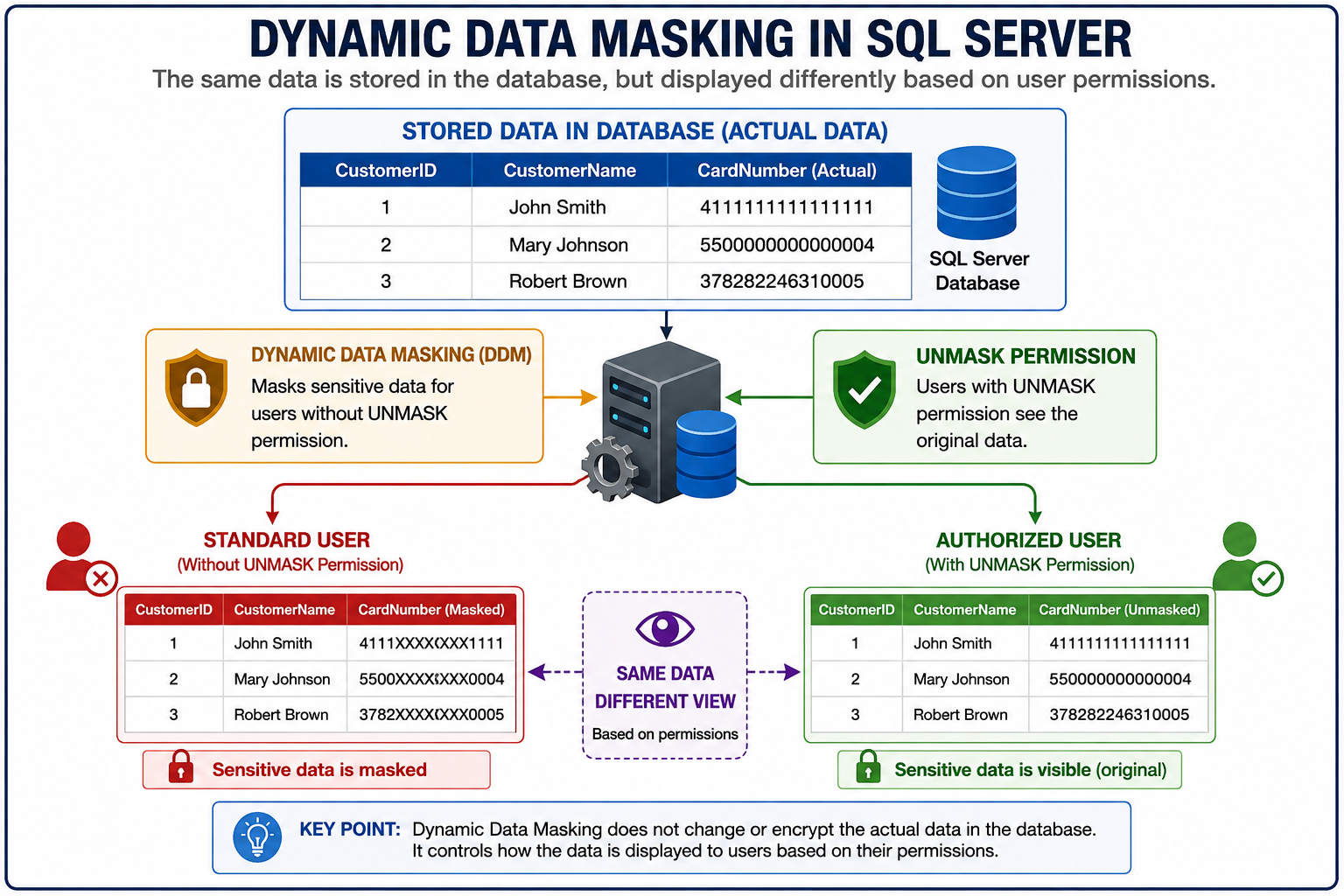
DDM Access Model
Stored Data
    |
    | 4111111111111111
    v
SQL Server
    |
    +----------------------+
    |                      |
    v                      v
Standard User        Authorized User
    |                      |
    v                      v
4111XXXXXX1111       4111111111111111
Why Use Dynamic Data Masking?
DDM is useful when users need access to records but should not automatically see complete sensitive values.
Typical examples include:
- Customer service users who need customer details but not complete card numbers.
- Application support teams investigating customer records.
- Reporting users.
- Developers working with non-production data.
- Operational users who need limited visibility.
- Database consumers who require
SELECTaccess but not full sensitive-data visibility.
Access to a record does not necessarily mean access to the complete sensitive value.
Important PCI Considerations
When Dynamic Data Masking is used with payment card data, DDM should be considered an additional security control, not a complete PCI DSS solution.
Example
Stored PAN
4111111111111111

        ↓

Dynamic Data Masking

        ↓

Standard User
4111XXXXXX1111
The original PAN still exists in the database.
- DDM does not encrypt PAN.
- DDM does not tokenize PAN.
- DDM does not remove the underlying data from the database.
- DDM does not independently establish PCI DSS compliance.
- DDM does not make prohibited data retention acceptable.
- Appropriate access control and other security controls are still required.
Sensitive Authentication Data must not be retained where prohibited by applicable PCI DSS requirements. DDM must never be used as a justification for storing data that should not be retained.
For PCI-related implementations, always perform the appropriate data classification and compliance assessment before implementation.
Prerequisites
Before implementing DDM, verify the following:
- SQL Server environment is identified.
- Target database is identified.
- Sensitive columns have been identified.
- Data classification has been completed.
- PCI applicability has been assessed where applicable.
- Business requirement has been approved.
- Required users and roles have been identified.
- Users requiring unmasked access have been identified.
- Application impact has been assessed.
- Change approval is available for Production implementation.
- Rollback procedure is available.
- Only approved test data is used for non-production testing.
Roles and Responsibilities
A typical DDM implementation involves several teams.
| Team / Role | Responsibility |
|---|---|
| Business / BA | Defines business requirement and data visibility requirement |
| Application Development | Reviews application impact and validates application behavior |
| Application Support | Performs operational validation and supports incidents |
| DBA | Designs and implements DDM, roles, permissions, validation, and rollback |
| IT Security / Information Security | Reviews security requirements, risks, and sensitive-data controls |
| Testing / QA | Performs formal functional and security validation |
| IT Governance | Reviews governance, process, and evidence requirements |
| Enterprise Architecture | Reviews architecture impact where applicable |
| IT Operations | Supports operational monitoring and infrastructure dependencies |
| Internal Audit | Performs independent assurance and control review |
AICD Matrix
The following matrix provides a generic AICD model for an enterprise SQL Server DDM implementation.
| Activity | DBA | DEV | App Support | BA | Testing | IT Security / InfoSec | IT Governance | Internal Audit | EA | IT Ops |
|---|---|---|---|---|---|---|---|---|---|---|
| Identify business requirement | C | C | C | A/D | I | C | I | I | I | I |
| Identify sensitive / PCI data | C | C | C | A/D | I | C | C | I | I | I |
| Define masking requirement | C | C | C | A | I | C | C | I | I | I |
| Perform security / PCI assessment | C | I | I | C | I | A/D | C | I | I | I |
| Perform technical feasibility assessment | A/D | C | C | I | I | C | I | I | C | C |
| Review application impact | C | D | C | A | C | I | I | I | I | I |
| Define masking function | A/D | C | C | C | C | C | I | I | C | I |
| Prepare implementation script | A/D | C | I | I | I | C | I | I | I | I |
| Prepare test cases | C | C | C | C | A/D | C | I | I | I | I |
| Implement DDM | A/D | I | C | I | I | C | I | I | I | C |
| Validate masked access | D | C | C | I | A | I | I | I | I | I |
| Approve unmasked access | C | C | C | A | I | C | I | I | I | I |
Grant UNMASK |
D | I | I | A | I | C | I | I | I | I |
Review UNMASK access |
D | I | C | C | I | A | C | I | I | I |
| Perform application validation | C | D | C | A | C | I | I | I | I | I |
| Maintain audit evidence | D | C | C | I | C | C | A | I | I | I |
| Perform periodic review | D | C | C | C | I | A | C | I | I | I |
| Perform independent audit | I | I | I | I | I | C | C | A/D | I | I |
| Execute rollback | A/D | I | C | C | C | C | I | I | I | C |
AICD Legend
- A – Accountable: Owns the outcome or approval.
- I – Informed: Kept informed of the activity or result.
- C – Consulted: Provides input or expertise.
- D – Doer: Performs or executes the activity.
Step-by-Step Dynamic Data Masking Implementation
Create the Demo Database
For this demonstration, use a dedicated test database.
USE master;
GO

CREATE DATABASE PCI_DDM_DEMO;
GO

USE PCI_DDM_DEMO;
GOUse a dedicated test environment for demonstrations. Do not use real production cardholder data for this POC.
Create the Customer Card Table
Create a table containing customer and payment card information.
CREATE TABLE dbo.CustomerCard
(
    CustomerID       INT IDENTITY(1,1) NOT NULL
        CONSTRAINT PK_CustomerCard PRIMARY KEY,

    CustomerName     VARCHAR(100) NOT NULL,
    CardNumber       CHAR(16) NOT NULL,
    CardExpiry       CHAR(5) NULL,
    CardStatus       VARCHAR(20) NULL
);
GO
Column Classification
| Column | Description | Classification |
|---|---|---|
CustomerID |
Customer identifier | Internal |
CustomerName |
Customer name | Sensitive / PII depending on classification |
CardNumber |
Payment card number / PAN | PCI-sensitive |
CardExpiry |
Card expiry information | Sensitive depending on context |
CardStatus |
Card status | Business data |
Insert Approved Test Data
Insert approved test data into the table.
INSERT INTO dbo.CustomerCard
(
    CustomerName,
    CardNumber,
    CardExpiry,
    CardStatus
)
VALUES
(
    'Test Customer 01',
    '4111111111111111',
    '12/29',
    'ACTIVE'
),
(
    'Test Customer 02',
    '5555555555554444',
    '06/30',
    'ACTIVE'
),
(
    'Test Customer 03',
    '6011111111111117',
    '09/28',
    'ACTIVE'
);
GOUse only approved test data in a POC. Do not copy production PAN data into Development or Test environments without appropriate authorization and controls.
View Data Before Masking
Before applying DDM, query the table.
SELECT
    CustomerID,
    CustomerName,
    CardNumber,
    CardExpiry,
    CardStatus
FROM dbo.CustomerCard;
GO
Example Result
CustomerID    CustomerName       CardNumber          CardExpiry    CardStatus
----------    ----------------   ----------------    ----------    ----------
1             Test Customer 01   4111111111111111    12/29         ACTIVE
2             Test Customer 02   5555555555554444    06/30         ACTIVE
3             Test Customer 03   6011111111111117    09/28         ACTIVE
Apply Dynamic Data Masking
Apply a partial mask to the CardNumber column.
ALTER TABLE dbo.CustomerCard
ALTER COLUMN CardNumber
ADD MASKED WITH
(
    FUNCTION = 'partial(4,"XXXXXX",4)'
);
GO
The masking function is designed to expose the first four and last four characters.
Example
Original:
4111111111111111

Masked:
4111XXXXXX1111
The stored value remains unchanged.
Validate DDM Configuration
SQL Server exposes masking configuration through sys.masked_columns.
SELECT
    DB_NAME() AS DatabaseName,
    SCHEMA_NAME(t.schema_id) AS SchemaName,
    t.name AS TableName,
    c.name AS ColumnName,
    c.is_masked,
    c.masking_function
FROM sys.masked_columns AS c
JOIN sys.tables AS t
    ON c.object_id = t.object_id
WHERE c.is_masked = 1;
GO
Example Result
| DatabaseName | SchemaName | TableName | ColumnName | is_masked | masking_function |
|---|---|---|---|---|---|
| PCI_DDM_DEMO | dbo | CustomerCard | CardNumber | 1 | partial(4,”XXXXXX”,4) |
Create Standard Card Data Role
Create a role for users who need access to the table but do not need to see the complete card number.
CREATE ROLE Card_Data_User;
GO

GRANT SELECT
ON dbo.CustomerCard
TO Card_Data_User;
GO
The role has table access but does not have UNMASK.
Create Authorized Card Data Role
Create a separate role for users who may require approved access to unmasked card data.
CREATE ROLE Card_Data_Authorized;
GO

GRANT SELECT
ON dbo.CustomerCard
TO Card_Data_Authorized;
GO
At this point, the role has SELECT but does not yet have UNMASK.
Create Standard Application User
CREATE USER Demo_ApplicationUser
WITHOUT LOGIN;
GO

ALTER ROLE Card_Data_User
ADD MEMBER Demo_ApplicationUser;
GO
Access Model
Demo_ApplicationUser
        |
        v
Card_Data_User
        |
        v
SELECT
        |
        v
Masked CardNumber
Create Authorized Card Operations User
CREATE USER Demo_CardOperations
WITHOUT LOGIN;
GO

ALTER ROLE Card_Data_Authorized
ADD MEMBER Demo_CardOperations;
GO
At this stage, the user has SELECT access but no UNMASK permission.
Test Standard User After Masking
Execute the query using the standard user security context.
EXECUTE AS USER = 'Demo_ApplicationUser';
GO

SELECT
    CustomerID,
    CustomerName,
    CardNumber,
    CardExpiry,
    CardStatus
FROM dbo.CustomerCard;
GO

REVERT;
GO
Expected Result
CustomerID    CustomerName       CardNumber        CardExpiry    CardStatus
----------    ----------------   --------------    ----------    ----------
1             Test Customer 01   4111XXXXXX1111    12/29         ACTIVE
2             Test Customer 02   5555XXXXXX4444    06/30         ACTIVE
3             Test Customer 03   6011XXXXXX1117    09/28         ACTIVE
The important observation is:
SELECT permission
        +
No UNMASK permission
        =
Masked CardNumber
Grant UNMASK to the Authorized Role
If an authorized user has a legitimate business requirement to see the original card number, UNMASK can be granted to the approved role.
GRANT UNMASK
TO Card_Data_Authorized;
GOUNMASK access should be subject to the organization’s access approval and security process.
Test Authorized User
EXECUTE AS USER = 'Demo_CardOperations';
GO

SELECT
    CustomerID,
    CustomerName,
    CardNumber,
    CardExpiry,
    CardStatus
FROM dbo.CustomerCard;
GO

REVERT;
GO
Expected Result
CustomerID    CustomerName       CardNumber          CardExpiry    CardStatus
----------    ----------------   ----------------    ----------    ----------
1             Test Customer 01   4111111111111111    12/29         ACTIVE
2             Test Customer 02   5555555555554444    06/30         ACTIVE
3             Test Customer 03   6011111111111117    09/28         ACTIVE
Authorized Access Model
Demo_CardOperations
        |
        v
Card_Data_Authorized
        |
        +---- SELECT
        |
        +---- UNMASK
        |
        v
Original CardNumber
Revoke UNMASK
When the business requirement no longer exists, revoke UNMASK.
REVOKE UNMASK
FROM Card_Data_Authorized;
GO
Test again:
EXECUTE AS USER = 'Demo_CardOperations';
GO

SELECT
    CustomerID,
    CustomerName,
    CardNumber,
    CardExpiry,
    CardStatus
FROM dbo.CustomerCard;
GO

REVERT;
GO
Expected Result
4111XXXXXX1111
5555XXXXXX4444
6011XXXXXX1117
This demonstrates that the same authorized role returns to masked visibility after UNMASK is revoked.
Review DDM Permissions
Review the permissions associated with the DDM roles.
SELECT
    dp.name AS PrincipalName,
    dp.type_desc,
    p.permission_name,
    p.state_desc
FROM sys.database_principals AS dp
LEFT JOIN sys.database_permissions AS p
    ON dp.principal_id = p.grantee_principal_id
WHERE dp.name IN
(
    'Card_Data_User',
    'Card_Data_Authorized'
)
ORDER BY
    dp.name,
    p.permission_name;
GO
Expected Access Model
| Role | Permission |
|---|---|
Card_Data_User |
SELECT |
Card_Data_Authorized |
SELECT |
Card_Data_Authorized |
UNMASK when approved |
Review Role Membership
Review which users belong to the DDM roles.
SELECT
    RoleName = r.name,
    MemberName = m.name
FROM sys.database_role_members AS rm
INNER JOIN sys.database_principals AS r
    ON rm.role_principal_id = r.principal_id
INNER JOIN sys.database_principals AS m
    ON rm.member_principal_id = m.principal_id
WHERE r.name IN
(
    'Card_Data_User',
    'Card_Data_Authorized'
)
ORDER BY
    r.name,
    m.name;
GO
This is useful for access reviews and audit evidence.
Validation Checklist
Pre-Implementation
- ☐ Business requirement approved.
- ☐ Data Owner approval obtained.
- ☐ Sensitive data identified.
- ☐ PCI applicability assessed.
- ☐ Approved test data confirmed.
- ☐ Application impact assessed.
- ☐ Users requiring unmasked access identified.
- ☐ Change approval obtained where required.
- ☐ Rollback plan prepared.
Implementation
- ☐ Correct database confirmed.
- ☐ Correct table confirmed.
- ☐ Correct column confirmed.
- ☐ DDM masking function applied.
- ☐
sys.masked_columnsvalidated. - ☐ Standard role created.
- ☐ Authorized role created.
- ☐ Required
SELECTpermissions granted. - ☐ Users assigned to appropriate roles.
Testing
- ☐ Data validated before masking.
- ☐ Standard user tested.
- ☐ Standard user receives masked PAN.
- ☐
UNMASKgranted through approved role. - ☐ Authorized user tested.
- ☐ Authorized user receives unmasked PAN.
- ☐
UNMASKrevoked. - ☐ Masked visibility revalidated.
- ☐ Application functionality validated.
Rollback Procedure
If DDM must be removed, execute:
ALTER TABLE dbo.CustomerCard
ALTER COLUMN CardNumber
DROP MASKED;
GO
Validate:
SELECT
    DB_NAME() AS DatabaseName,
    SCHEMA_NAME(t.schema_id) AS SchemaName,
    t.name AS TableName,
    c.name AS ColumnName,
    c.is_masked,
    c.masking_function
FROM sys.masked_columns AS c
JOIN sys.tables AS t
    ON c.object_id = t.object_id
WHERE c.object_id = OBJECT_ID('dbo.CustomerCard');
GO
Rollback validation should confirm:
- Masking configuration is removed.
- Application functionality is validated.
- Access permissions are reviewed.
- Security implications are assessed.
- Change documentation is updated.
Removing DDM does not restore or modify data because DDM does not modify the underlying stored value.
Change Management
Production DDM changes should follow the organization’s approved Change Management process.
The change request should include:
- Business justification.
- Database and SQL Server instance.
- Schema, table, and column.
- Data classification.
- PCI applicability.
- Masking function.
- Affected users and roles.
UNMASKrequirement, if applicable.- Security assessment.
- Application impact assessment.
- Implementation plan.
- Validation plan.
- Rollback plan.
- Required approvals.
Audit Evidence
Recommended evidence includes:
- Approved change request.
- Business/Data Owner approval.
- Security approval where applicable.
- PCI assessment where applicable.
- Pre-change configuration.
- Implementation script.
sys.masked_columnsoutput.- Standard-user validation.
- Authorized-user validation.
UNMASKapproval.- Role membership evidence.
- Permission review evidence.
- Application validation.
- Rollback evidence where applicable.
DDM Configuration Evidence Query
SELECT
    DB_NAME() AS DatabaseName,
    SCHEMA_NAME(t.schema_id) AS SchemaName,
    t.name AS TableName,
    c.name AS ColumnName,
    c.is_masked,
    c.masking_function
FROM sys.masked_columns AS c
JOIN sys.tables AS t
    ON c.object_id = t.object_id
WHERE c.is_masked = 1;
GO
Periodic Review
DDM configuration and access should be periodically reviewed according to organizational security and access governance requirements.
The review should confirm:
- ☐ Sensitive columns remain correctly classified.
- ☐ DDM remains required.
- ☐ Masking function remains appropriate.
- ☐ Standard users still require access.
- ☐ Authorized users still require access.
- ☐
UNMASKaccess remains justified. - ☐ Unnecessary
UNMASKpermissions are revoked. - ☐ Role memberships remain accurate.
- ☐ Audit evidence is available.
- ☐ PCI/security requirements remain applicable and satisfied.
Troubleshooting
User Can See the Full Card Number
Check whether the user or an applicable role has UNMASK.
SELECT
    dp.name AS PrincipalName,
    dp.type_desc,
    p.permission_name,
    p.state_desc
FROM sys.database_principals AS dp
LEFT JOIN sys.database_permissions AS p
    ON dp.principal_id = p.grantee_principal_id
WHERE p.permission_name = 'UNMASK';
GO
Also review:
- Role membership.
- User context.
- Elevated privileges.
- Application connection identity.
User Cannot Access the Table
Verify:
- Database user exists.
- User is a member of the correct role.
- Role has
SELECT. - Correct database is being queried.
- Object name and schema are correct.
Application Stops Working After DDM
Possible causes include:
- Application expects the original value.
- Application performs validation against the returned value.
- Application uses the card number in business logic.
- Application service account does not have the expected access.
Recommended Approach
- Review application logs.
- Identify the application connection account.
- Validate its effective permissions.
- Confirm whether unmasked access is genuinely required.
- Do not grant
UNMASKwithout an approved requirement. - Modify the application or masking approach where appropriate.
- Roll back the change if required to restore service.
DDM Configuration Is Not Visible
Run:
SELECT
    c.name,
    c.is_masked,
    c.masking_function
FROM sys.masked_columns AS c
WHERE c.object_id = OBJECT_ID('dbo.CustomerCard');
GO
Confirm:
- Correct database.
- Correct schema.
- Correct table.
- Correct column.
- Successful execution of the masking statement.
- SQL Server error messages.
Troubleshooting Escalation Matrix
| Severity | Example | Initial Owner | Escalation |
|---|---|---|---|
| Low | Incorrect masking format in non-production | DBA | DBA Lead |
| Medium | Application/report displays masked data unexpectedly | DBA + Application Support | Application Manager |
| High | Production application functionality impacted | DBA + Application Support + DEV | Change Manager / Technical Management |
| High | Unauthorized UNMASK access identified |
DBA + IT Security / InfoSec | Security Management |
| Critical | Cardholder data exposed to unauthorized users | DBA + IT Security / InfoSec | Security Incident Response |
| Critical | Potential prohibited payment authentication data identified | DBA + Security + Compliance | PCI / Compliance Management |
Security Best Practices
The following practices should be followed when implementing DDM.
Use Least Privilege
Do not grant users more access than required.
Separate Masked and Unmasked Access
Use different roles where practical.
Card_Data_User
    |
    +-- SELECT
    |
    +-- Masked Data
Authorized access:
Card_Data_Authorized
    |
    +-- SELECT
    +-- UNMASK
    |
    +-- Original Data
Control UNMASK Access
UNMASK should be treated as sensitive access and should be:
- Business justified.
- Approved.
- Restricted.
- Periodically reviewed.
- Removed when no longer required.
Do Not Treat DDM as Encryption
DDM controls the presentation of data; it does not protect the underlying value in the same way as encryption.
Combine DDM With Other Security Controls
Depending on the environment and requirements, consider:
- Least privilege.
- Role-Based Access Control.
- SQL Server Audit.
- Encryption.
- Always Encrypted where appropriate.
- Tokenization where appropriate.
- Application security.
- Network security.
- Monitoring.
- Periodic access review.
DDM vs Encryption
| Control | DDM | Encryption |
|---|---|---|
| Changes underlying stored value | No | Depends on encryption method |
| Masks query results | Yes | Not its primary purpose |
| Protects data at rest | No | Yes, where applicable |
| Controls user visibility | Yes | Depends on implementation |
| Replaces authorization | No | No |
| Replaces PCI controls | No | No |
| Primary purpose | Reduce data exposure | Protect confidentiality of data |
Key Takeaways
Dynamic Data Masking is a useful SQL Server security feature for reducing unnecessary exposure of sensitive information.
Standard User
User + SELECT
      |
      v
No UNMASK
      |
      v
Masked Data
Authorized User
User + SELECT + UNMASK
      |
      v
Original Data
After UNMASK Is Revoked
User + SELECT
      |
      v
Masked DataFor payment card data, DDM should be considered an additional security layer rather than a standalone PCI DSS control.
The underlying PAN remains in the database, so appropriate authorization, protection, monitoring, retention, and compliance controls remain necessary.
Summary
This SQL Server Dynamic Data Masking implementation demonstrates how organizations can provide controlled access to sensitive payment card information while reducing unnecessary exposure of complete card numbers.
The demonstrated design provides:
- Role-based access.
- Masked visibility for standard users.
- Controlled unmasked visibility for authorized users.
- Explicit
UNMASKmanagement. - Permission and role validation.
- Audit evidence.
- Rollback capability.
- Periodic access review.
- PCI and security considerations.
Users should receive only the level of sensitive-data visibility required to perform their responsibilities.
General Disclaimer
The scripts and recommendations provided in this article are intended for educational and operational guidance.
Always test scripts in a non-production environment before implementation.
Do not use real production payment card data for demonstration or testing unless specifically authorized and protected according to applicable organizational, regulatory, and security requirements.
Dynamic Data Masking should not be considered a substitute for encryption, access control, auditing, tokenization, data retention controls, or applicable PCI DSS requirements.
Always validate the implementation against your organization’s security standards, change management procedures, data classification requirements, and compliance obligations.
References
- Microsoft SQL Server Dynamic Data Masking documentation.
- Microsoft SQL Server documentation for
sys.masked_columns. - Microsoft SQL Server documentation for database roles and permissions.
- Microsoft SQL Server documentation for
UNMASK. - PCI Security Standards Council – PCI DSS and applicable guidance.
- Organization Information Security Policy.
- Organization Data Classification Policy.
- Organization Access Management Policy.
- Organization Change Management Policy.
