SQL Server Database Mail & Operator Configuration Guide
SQLTalent.com
SQL Server Administration
Intermediate to Advanced DBA
SQL Server 2012–2022
June 2026
Table of Contents
- Overview
- Prerequisites
- Database Mail Configuration
- SQL Agent Configuration
- Operator Configuration
- Validation Queries
- Troubleshooting
- Maintenance & Cleanup
- Security Best Practices
- Operational Best Practices
- Validation Checklist
- Disclaimer
Overview
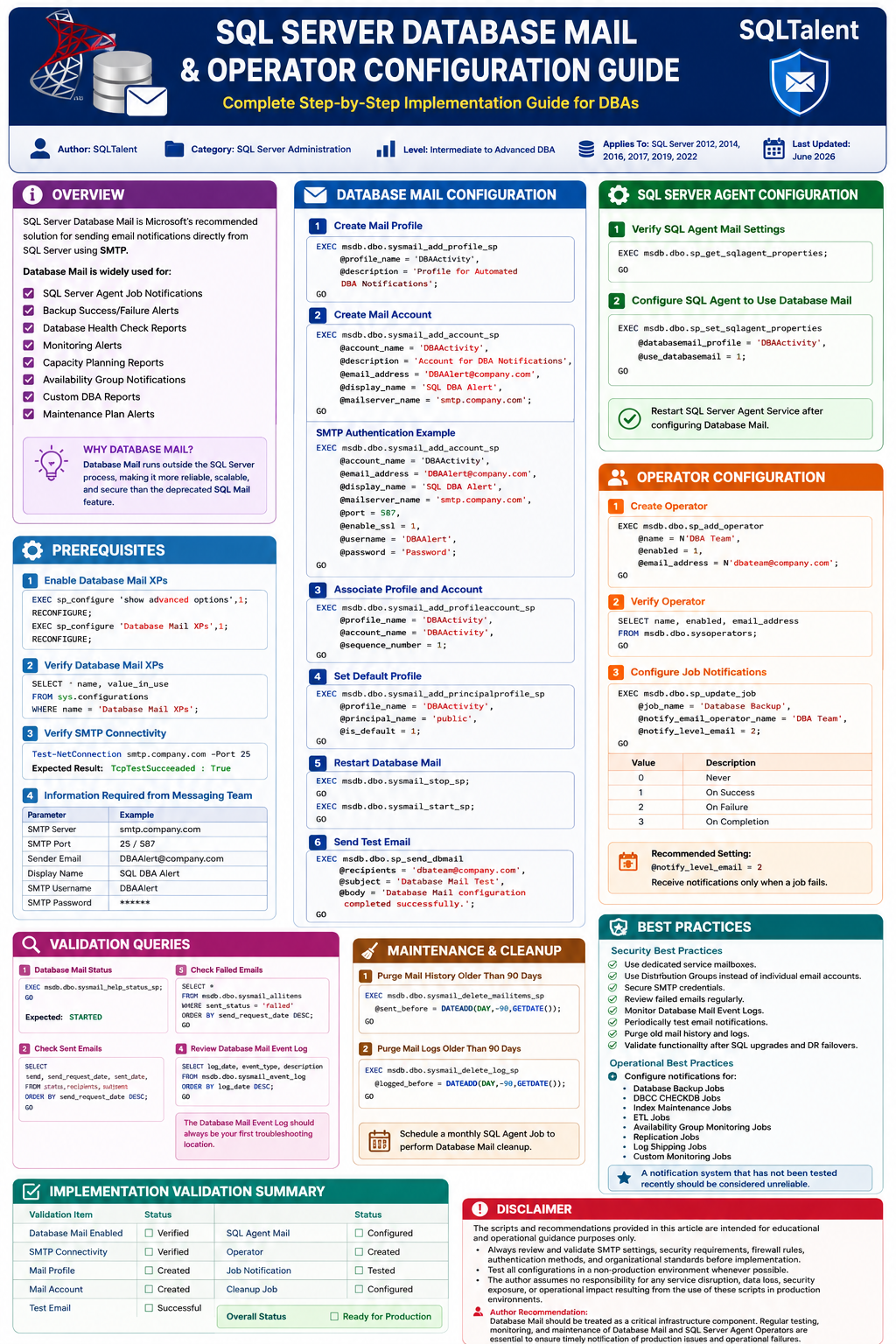
SQL Server Database Mail is Microsoft’s recommended solution for sending email notifications directly from SQL Server using SMTP.
Database Mail is widely used for:
- SQL Server Agent Job Notifications
- Backup Success/Failure Alerts
- Database Health Check Reports
- Monitoring Alerts
- Capacity Planning Reports
- Availability Group Notifications
- Custom DBA Reports
- Maintenance Plan Alerts
Database Mail runs outside the SQL Server process, making it more reliable, scalable, and secure than the deprecated SQL Mail feature.
Prerequisites
1. Enable Database Mail XPs
USE master;
GO
EXEC sp_configure 'show advanced options',1;
GO
RECONFIGURE;
GO
EXEC sp_configure 'Database Mail XPs',1;
GO
RECONFIGURE;
GO
2. Verify Database Mail XPs
SELECT
       name,
       value_in_use
FROM sys.configurations
WHERE name = 'Database Mail XPs';
3. Verify SMTP Connectivity
Test-NetConnection smtp.company.com -Port 25
Expected Result:
TcpTestSucceeded : True
4. Information Required from Messaging Team
| Parameter | Example |
|---|---|
| SMTP Server | smtp.company.com |
| SMTP Port | 25 / 587 |
| Sender Email | DBAAlert@company.com |
| Display Name | SQL DBA Alert |
| SMTP Username | DBAAlert |
| SMTP Password | ****** |
Database Mail Configuration
Step 1 – Create Mail Profile
EXEC msdb.dbo.sysmail_add_profile_sp
     @profile_name = 'DBAActivity',
     @description = 'Profile for Automated DBA Notifications';
GO
Step 2 – Create Mail Account
EXEC msdb.dbo.sysmail_add_account_sp
    @account_name = 'DBAActivity',
    @description = 'Account for DBA Notifications',
    @email_address = 'DBAAlert@company.com',
    @display_name = 'SQL DBA Alert',
    @mailserver_name = 'smtp.company.com';
GO
SMTP Authentication Example
EXEC msdb.dbo.sysmail_add_account_sp
    @account_name = 'DBAActivity',
    @email_address = 'DBAAlert@company.com',
    @display_name = 'SQL DBA Alert',
    @mailserver_name = 'smtp.company.com',
    @port = 587,
    @enable_ssl = 1,
    @username = 'DBAAlert',
    @password = 'Password';
GO
Step 3 – Associate Profile and Account
EXEC msdb.dbo.sysmail_add_profileaccount_sp
     @profile_name = 'DBAActivity',
     @account_name = 'DBAActivity',
     @sequence_number = 1;
GO
Step 4 – Set Default Profile
EXEC msdb.dbo.sysmail_add_principalprofile_sp
     @profile_name = 'DBAActivity',
     @principal_name = 'public',
     @is_default = 1;
GO
Step 5 – Restart Database Mail
EXEC msdb.dbo.sysmail_stop_sp;
GO

EXEC msdb.dbo.sysmail_start_sp;
GO
Step 6 – Send Test Email
EXEC msdb.dbo.sp_send_dbmail
     @recipients = 'dbateam@company.com',
     @subject = 'Database Mail Test',
     @body = 'Database Mail configuration completed successfully.';
GO
SQL Server Agent Configuration
Verify SQL Agent Mail Settings
EXEC msdb.dbo.sp_get_sqlagent_properties;
GO
Configure SQL Agent to Use Database Mail
EXEC msdb.dbo.sp_set_sqlagent_properties
     @databasemail_profile = 'DBAActivity',
     @use_databasemail = 1;
GO
SQL Server Agent Operator Configuration
Create Operator
USE msdb;
GO
EXEC dbo.sp_add_operator
     @name = N'DBA Team',
     @enabled = 1,
     @email_address = N'dbateam@company.com';
GO
Verify Operator
SELECT
       name,
       enabled,
       email_address
FROM msdb.dbo.sysoperators;
GO
Configure Job Notifications
EXEC msdb.dbo.sp_update_job
     @job_name = 'Database Backup',
     @notify_email_operator_name = 'DBA Team',
     @notify_level_email = 2;
GO
| Value | Description |
|---|---|
| 0 | Never |
| 1 | On Success |
| 2 | On Failure |
| 3 | On Completion |
Recommended Setting:
@notify_level_email = 2
Receive notifications only when a job fails.
Validation Queries
Database Mail Status
EXEC msdb.dbo.sysmail_help_status_sp;
GO
Expected:
STARTED
Check Sent Emails
SELECT
    send_request_date,
    sent_date,
    sent_status,
    recipients,
    subject
FROM msdb.dbo.sysmail_allitems
ORDER BY send_request_date DESC;
GO
Check Failed Emails
SELECT *
FROM msdb.dbo.sysmail_allitems
WHERE sent_status = 'failed'
ORDER BY send_request_date DESC;
GO
Review Database Mail Event Log
SELECT
    log_date,
    event_type,
    description
FROM msdb.dbo.sysmail_event_log
ORDER BY log_date DESC;
GO
Maintenance & Cleanup
Purge Mail History Older Than 90 Days
EXEC msdb.dbo.sysmail_delete_mailitems_sp
     @sent_before = DATEADD(DAY,-90,GETDATE());
GO
Purge Mail Logs Older Than 90 Days
EXEC msdb.dbo.sysmail_delete_log_sp
     @logged_before = DATEADD(DAY,-90,GETDATE());
GO
Security Best Practices
- Use dedicated service mailboxes.
- Use Distribution Groups instead of individual email accounts.
- Secure SMTP credentials.
- Review failed emails regularly.
- Monitor Database Mail Event Logs.
- Periodically test email notifications.
- Purge old mail history and logs.
- Validate functionality after SQL upgrades and DR failovers.
Operational Best Practices
Configure notifications for:
- Database Backup Jobs
- DBCC CHECKDB Jobs
- Index Maintenance Jobs
- ETL Jobs
- Availability Group Monitoring Jobs
- Replication Jobs
- Log Shipping Jobs
- Custom Monitoring Jobs
A notification system that has not been tested recently should be considered unreliable.
Implementation Validation Summary
| Validation Item | Status |
|---|---|
| Database Mail Enabled | ☐ Verified |
| SMTP Connectivity | ☐ Verified |
| Mail Profile | ☐ Created |
| Mail Account | ☐ Created |
| Test Email | ☐ Successful |
| SQL Agent Mail | ☐ Configured |
| Operator | ☐ Created |
| Job Notification | ☐ Tested |
| Cleanup Job | ☐ Configured |
| Overall Status | ☐ Ready for Production |
Disclaimer
The scripts and recommendations provided in this article are intended for educational and operational guidance purposes only.
Always review and validate SMTP settings, security requirements, firewall rules, authentication methods, and organizational standards before implementation.
Test all configurations in a non-production environment whenever possible.
The author assumes no responsibility for any service disruption, data loss, security exposure, or operational impact resulting from the use of these scripts in production environments.
Author Recommendation:
Database Mail should be treated as a critical infrastructure component. Regular testing, monitoring, and maintenance of Database Mail and SQL Server Agent Operators are essential to ensure timely notification of production issues and operational failures.
[sqltalent_disclaimer]
