
SQL Server DBCC CHECKDB – Complete Guide for Large Production Databases
Introduction
DBCC CHECKDB is one of the most important maintenance commands in Microsoft SQL Server. It verifies the logical and physical integrity of a database and helps identify corruption before it affects business operations.
For organizations running mission-critical applications such as banking, healthcare, ERP, or financial systems, database corruption can lead to data loss, service disruption, and compliance issues. Regular database integrity validation is therefore considered a best practice.
This article discusses how DBCC CHECKDB works, its impact on large production databases, and recommended strategies for SQL Server 2019 Standard Edition environments.
What is DBCC CHECKDB?
DBCC CHECKDB (Database Console Command CHECKDB) is a SQL Server command that validates the consistency and integrity of an entire database.
It performs multiple internal consistency checks, including:
- Allocation consistency
- Table consistency
- Index consistency
- System catalog validation
- Metadata validation
- Link consistency between database objects
- Page checksum verification
- Detection of physical and logical corruption
Example:
DBCC CHECKDB ('DatabaseName');For routine production checks where minimal impact is desired:
DBCC CHECKDB ('DatabaseName') WITH PHYSICAL_ONLY;What Does DBCC CHECKDB Do?
Internally, SQL Server performs several validation steps:
- Reads every allocated data page
- Validates page headers
- Verifies page checksums
- Checks allocation maps (GAM, SGAM, PFS, IAM)
- Validates clustered and nonclustered indexes
- Checks system metadata
- Confirms object relationships
- Detects corruption caused by hardware, storage, memory, or software issues
Unlike backups, DBCC CHECKDB confirms that the database structure itself is internally consistent.
Benefits of Running DBCC CHECKDB
- Early detection of database corruption
- Validation of physical and logical consistency
- Detection of storage-related corruption
- Verification of index integrity
- Increased confidence in database recoverability
- Support for compliance and audit requirements
- Reduced risk of unexpected production outages
Typical Production Environment
Example environment:
- SQL Server 2019 Standard Edition
- 11 Production Databases
- Largest database: 5 TB
- Second largest: 3 TB
- One database: 1 TB
- Remaining databases: 100 GB–500 GB
- 24×7 mission-critical workload
How Long Does DBCC CHECKDB Take?
There is no fixed execution time.
Execution depends on:
- Database size
- Number of database objects
- Storage performance
- CPU
- Memory
- TempDB performance
- Current workload
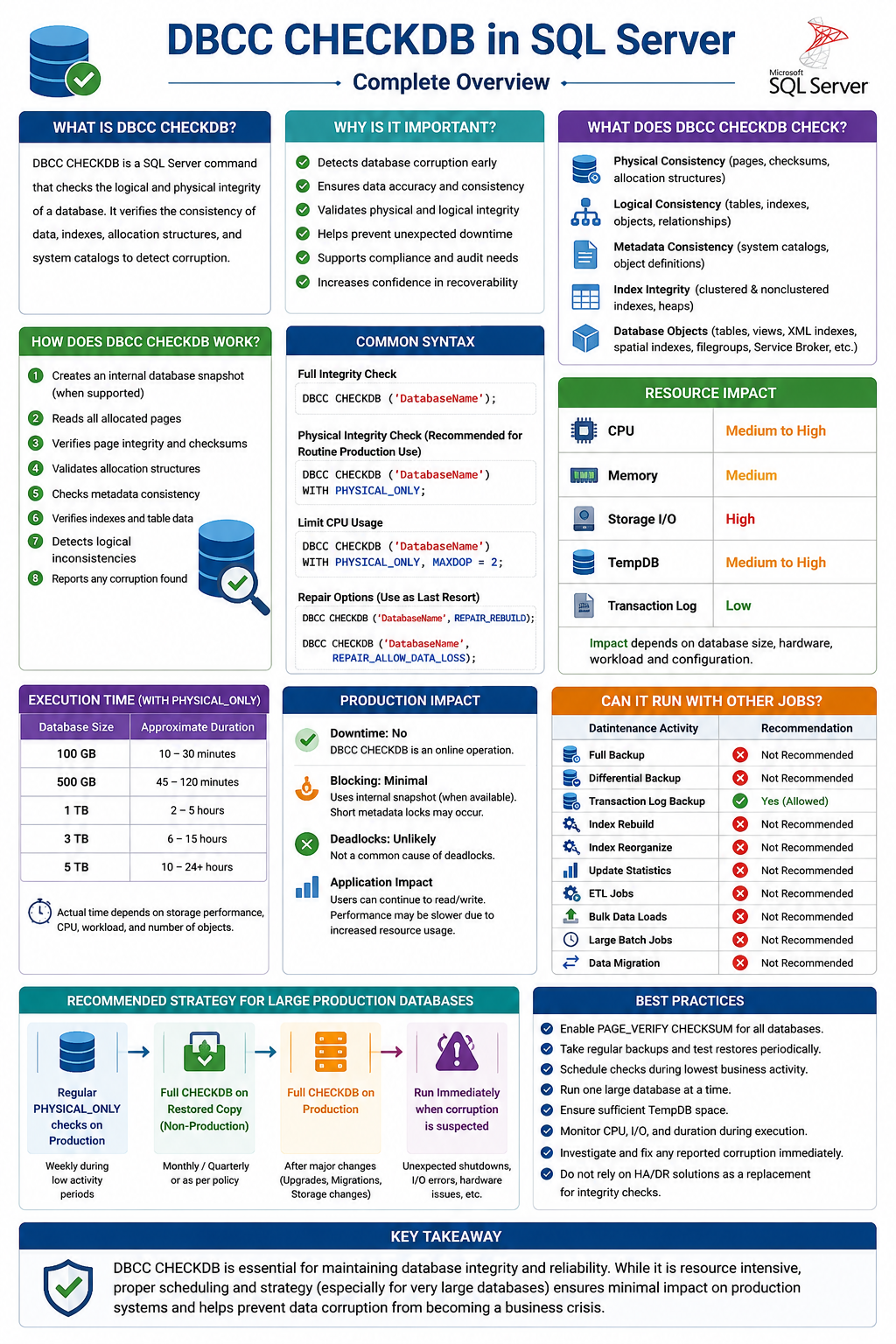
Typical estimates for WITH PHYSICAL_ONLY:
| Database Size | Approximate Duration |
|---|---|
| 100 GB | 10–30 minutes |
| 500 GB | 45–120 minutes |
| 1 TB | 2–5 hours |
| 3 TB | 6–15 hours |
| 5 TB | 10–24+ hours |
A full DBCC CHECKDB without PHYSICAL_ONLY can take considerably longer.
These are estimates only. Actual execution time depends primarily on the storage subsystem and workload.
Does DBCC CHECKDB Cause Downtime?
No.
DBCC CHECKDB is an online operation.
SQL Server creates an internal database snapshot (when possible), allowing users to continue reading and writing data while consistency checks are performed.
Normal business operations continue during execution.
Does DBCC CHECKDB Block Users?
Generally, No.
User queries continue to execute.
However, because DBCC CHECKDB is resource intensive, users may experience slower response times if the server becomes CPU or I/O bound.
Can DBCC CHECKDB Cause Deadlocks?
Normally, No.
DBCC CHECKDB is not a common cause of deadlocks.
However, if it is executed simultaneously with heavy maintenance activities such as offline index rebuilds or other resource-intensive operations, waiting and blocking may occur due to resource contention rather than because of DBCC CHECKDB itself.
Resource Consumption
During execution, DBCC CHECKDB consumes system resources.
CPU
- Moderate to High
- Uses multiple worker threads
- Higher CPU usage for large databases
Memory
- Moderate
- SQL Server allocates memory internally for processing
- Memory usage is released after completion
Storage I/O
- High sequential reads
- Large databases generate significant read activity
- Storage throughput is often the limiting factor
TempDB
DBCC CHECKDB may increase TempDB usage, particularly on busy OLTP systems where many pages are modified during execution.
Ensure adequate TempDB capacity before scheduling integrity checks.
Transaction Log
DBCC CHECKDB itself does not significantly grow the transaction log because it is primarily a read-only operation.
Can DBCC CHECKDB Run with Other Maintenance Jobs?
Running multiple maintenance activities together is not recommended.
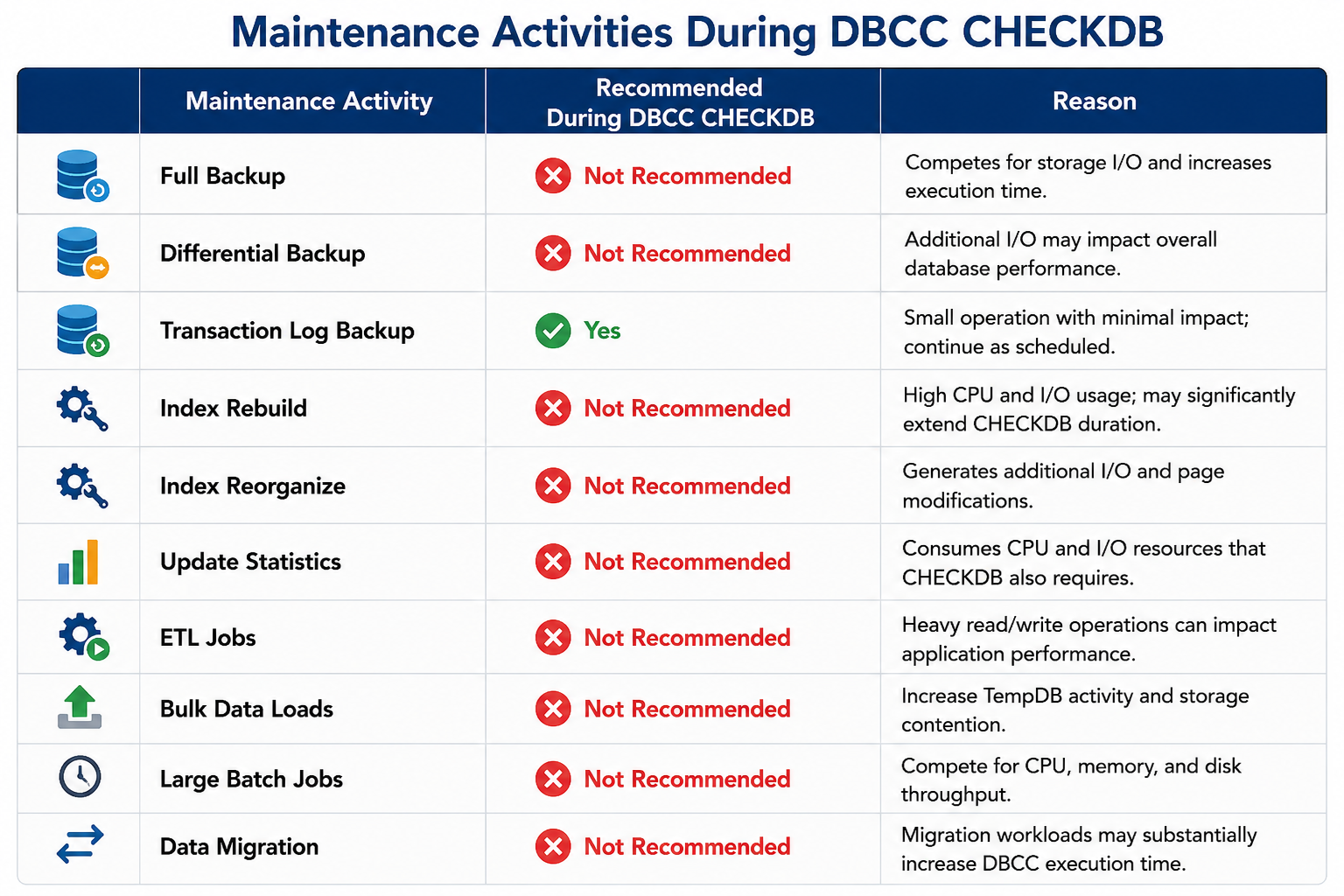
The following table summarizes the guidance:
| Maintenance Activity | Recommended During DBCC CHECKDB | Reason |
|---|---|---|
| Full Backup | ❌ Not Recommended | Competes for storage I/O and increases DBCC CHECKDB execution time. |
| Differential Backup | ❌ Not Recommended | Additional I/O may impact overall database performance. |
| Transaction Log Backup | ✅ Recommended | Small operation with minimal impact and should continue as scheduled. |
| Index Rebuild | ❌ Not Recommended | Consumes high CPU, memory and storage I/O, significantly increasing DBCC CHECKDB duration. |
| Index Reorganize | ❌ Not Recommended | Generates additional page modifications and storage I/O. |
| Update Statistics | ❌ Not Recommended | Consumes CPU and I/O resources required by DBCC CHECKDB. |
| ETL Jobs | ❌ Not Recommended | Heavy read/write activity may impact application performance and increase execution time. |
| Bulk Data Loads | ❌ Not Recommended | Increases TempDB activity, transaction log generation, and storage contention. |
| Large Batch Jobs | ❌ Not Recommended | Competes for CPU, memory, and disk throughput. |
| Data Migration | ❌ Not Recommended | Migration workloads significantly increase resource utilization and DBCC CHECKDB execution time. |
Although some of these operations can technically run at the same time, they compete for CPU, memory, storage I/O, and TempDB, increasing the duration of all activities and potentially affecting application performance.
Is It Advisable to Run DBCC CHECKDB on Production?
The answer depends on database size and business criticality.
For small and medium databases, running a full DBCC CHECKDB during a maintenance window is generally acceptable.
For very large databases (multi-terabyte) supporting 24×7 business operations, routinely running a full DBCC CHECKDB on the production server may not be operationally practical because of the significant resource consumption.
Many organizations instead adopt the following approach:
- Run
DBCC CHECKDB WITH PHYSICAL_ONLYon Production during low-activity periods. - Restore production backups to a non-production server and perform a full
DBCC CHECKDBthere. - Execute a full
DBCC CHECKDBafter major migrations, SQL Server upgrades, storage migrations, or when corruption is suspected. - Regularly validate backup and restore procedures to ensure recoverability.
This approach balances database integrity assurance with production performance and availability.
Best Practices
- Schedule integrity checks during periods of lowest business activity.
- Run one large database at a time.
- Ensure TempDB has sufficient free space.
- Avoid overlapping with index maintenance, ETL, or large backup operations.
- Monitor CPU, memory, and storage latency during execution.
- Investigate and resolve any reported corruption immediately.
- Test backup restoration regularly.
Conclusion
DBCC CHECKDB remains the most reliable method for detecting database corruption in SQL Server. While it is an essential component of a database maintenance strategy, its execution on very large production databases requires careful planning due to its resource-intensive nature.
For organizations managing multi-terabyte SQL Server databases, the recommended practice is to perform lightweight physical integrity checks on production, execute full integrity validation on restored copies in non-production environments whenever possible, and perform full production integrity checks only during planned maintenance windows or after significant infrastructure changes.
A well-designed integrity-check strategy helps maintain database reliability while minimizing operational risk and ensuring continuous business availability.
