Overview
SQL Server Audit is a native Microsoft SQL Server security feature used to record and track database and server-level activities. It provides an audit trail that can be used for security monitoring, compliance, troubleshooting, forensic investigation, and privileged-user activity tracking.
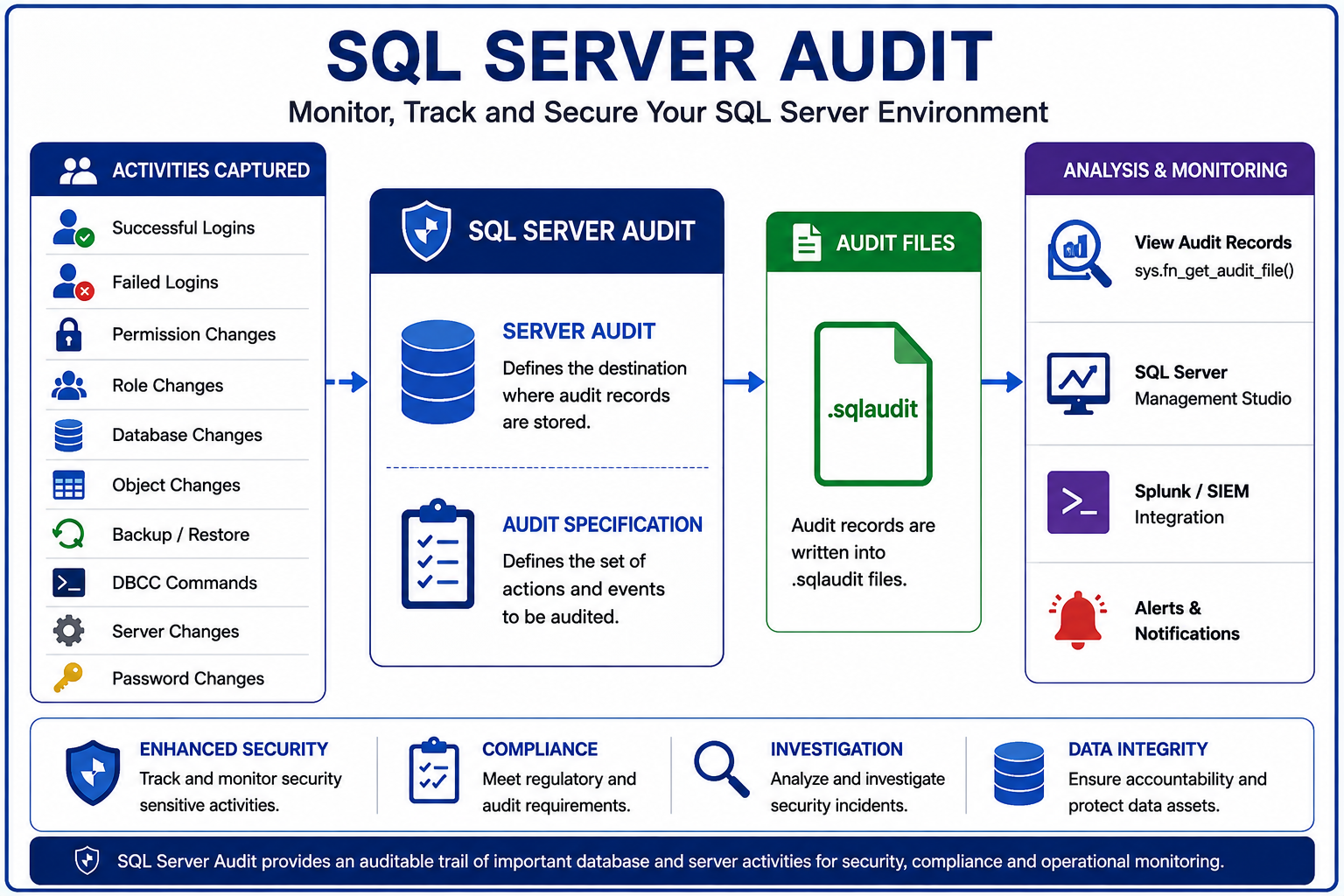
SQL Server Audit can capture activities such as login events, login changes, permission changes, database changes, role membership changes, backup and restore operations, DBCC commands, and other security-sensitive activities.
Key Components
SQL Server Audit consists primarily of two components:
1. Server Audit
The Server Audit defines where and how audit records are stored.
Example:
CREATE SERVER AUDIT [SQL_AUDIT]
TO FILE
(
    FILEPATH = N'D:\SQLAUDIT\',
    MAXSIZE = 100 MB,
    MAX_ROLLOVER_FILES = 100,
    RESERVE_DISK_SPACE = OFF
)
WITH
(
    QUEUE_DELAY = 1000,
    ON_FAILURE = CONTINUE
);
The audit destination can be configured according to the organization’s security and retention requirements.
2. Server Audit Specification
The Server Audit Specification defines which server-level audit action groups should be captured.
USE [master];
GO

CREATE SERVER AUDIT SPECIFICATION [SQL_Server_AuditSpecification]
FOR SERVER AUDIT [SQL_AUDIT]

ADD (DATABASE_ROLE_MEMBER_CHANGE_GROUP),
ADD (SERVER_ROLE_MEMBER_CHANGE_GROUP),
ADD (BACKUP_RESTORE_GROUP),
ADD (AUDIT_CHANGE_GROUP),
ADD (DBCC_GROUP),
ADD (DATABASE_PERMISSION_CHANGE_GROUP),
ADD (DATABASE_OBJECT_PERMISSION_CHANGE_GROUP),
ADD (SCHEMA_OBJECT_PERMISSION_CHANGE_GROUP),
ADD (SERVER_OBJECT_PERMISSION_CHANGE_GROUP),
ADD (SERVER_PERMISSION_CHANGE_GROUP),
ADD (SERVER_PRINCIPAL_IMPERSONATION_GROUP),
ADD (FAILED_LOGIN_GROUP),
ADD (SUCCESSFUL_LOGIN_GROUP),
ADD (DATABASE_CHANGE_GROUP),
ADD (DATABASE_OBJECT_CHANGE_GROUP),
ADD (DATABASE_PRINCIPAL_CHANGE_GROUP),
ADD (SCHEMA_OBJECT_CHANGE_GROUP),
ADD (SERVER_OBJECT_CHANGE_GROUP),
ADD (SERVER_PRINCIPAL_CHANGE_GROUP),
ADD (SERVER_OPERATION_GROUP),
ADD (APPLICATION_ROLE_CHANGE_PASSWORD_GROUP),
ADD (LOGIN_CHANGE_PASSWORD_GROUP),
ADD (SERVER_STATE_CHANGE_GROUP),
ADD (DATABASE_OWNERSHIP_CHANGE_GROUP),
ADD (DATABASE_OBJECT_OWNERSHIP_CHANGE_GROUP),
ADD (SCHEMA_OBJECT_OWNERSHIP_CHANGE_GROUP),
ADD (SERVER_OBJECT_OWNERSHIP_CHANGE_GROUP)

WITH (STATE = ON);
GO
Example activities include:
- Successful login
- Failed login
- Login creation
- Login modification
- Login deletion
- Password changes
- Permission changes
- Role membership changes
- Database changes
- Database object changes
- Backup and restore
- DBCC operations
- Ownership changes
- Server configuration changes
Common SQL Server Audit Action Groups
| Audit Group | Purpose |
|---|---|
FAILED_LOGIN_GROUP |
Captures failed SQL Server authentication attempts. |
SUCCESSFUL_LOGIN_GROUP |
Captures successful login activity. |
BACKUP_RESTORE_GROUP |
Captures database backup and restore operations. |
DATABASE_CHANGE_GROUP |
Captures database-level configuration and structural changes. |
DATABASE_OBJECT_CHANGE_GROUP |
Captures changes to database objects such as tables, views, procedures, and functions. |
DATABASE_PERMISSION_CHANGE_GROUP |
Captures database-level permission changes including GRANT, REVOKE, and DENY operations. |
DATABASE_ROLE_MEMBER_CHANGE_GROUP |
Captures changes to database role membership. |
SERVER_PERMISSION_CHANGE_GROUP |
Captures changes to server-level permissions. |
SERVER_ROLE_MEMBER_CHANGE_GROUP |
Captures additions or removals of members from server roles. |
SERVER_PRINCIPAL_CHANGE_GROUP |
Captures changes to SQL Server logins and other server principals. |
DATABASE_PRINCIPAL_CHANGE_GROUP |
Captures changes to database users, roles, and other database principals. |
AUDIT_CHANGE_GROUP |
Captures changes to SQL Server Audit configuration and audit specifications. |
DBCC_GROUP |
Captures DBCC commands executed against SQL Server. |
SERVER_STATE_CHANGE_GROUP |
Captures changes to SQL Server server state. |
SERVER_OPERATION_GROUP |
Captures selected server-level operational activities. |
LOGIN_CHANGE_PASSWORD_GROUP |
Captures SQL Server login password change activity. |
Audit File Location
When SQL Server Audit is configured with a file destination, audit events are stored as .sqlaudit files.
Example:
D:\SQLAUDIT
- Maximum file size
- Rollover file count
- Disk-space configuration
- Audit retention policy
Audit files should be protected from unauthorized modification or deletion.
Viewing SQL Audit Records
SQL Server provides the following function to read audit files:
SELECT TOP (100)
    event_time,
    action_id,
    succeeded,
    server_principal_name,
    session_server_principal_name,
    target_server_principal_name,
    database_name,
    schema_name,
    object_name,
    statement,
    host_name,
    client_ip,
    application_name,
    file_name
FROM sys.fn_get_audit_file
(
    'D:\SQLAUDIT\SQL_AUDIT_*.sqlaudit',
    DEFAULT,
    DEFAULT
)
ORDER BY event_time DESC;
Sample Script
1. CREATE LOGIN
Creates a test SQL Server login for audit validation.
CREATE LOGIN [SQLTalent_TestUser]
WITH PASSWORD = 'Use-A-Strong-Test-Password-Here!';
GO
2. ALTER LOGIN
Example: Disable the test login.
ALTER LOGIN [SQLTalent_TestUser]
DISABLE;
GO
Example: Enable the test login again.
ALTER LOGIN [SQLTalent_TestUser]
ENABLE;
GO
3. GRANT
Grant a database permission to the test user.
USE [SQLTalent_TestDB];
GO

GRANT SELECT
ON SCHEMA::dbo
TO [SQLTalent_TestUser];
GO
4. REVOKE
Remove the previously granted permission.
USE [SQLTalent_TestDB];
GO

REVOKE SELECT
ON SCHEMA::dbo
FROM [SQLTalent_TestUser];
GO
5. DENY
Explicitly deny SELECT permission to the test user.
USE [SQLTalent_TestDB];
GO

DENY SELECT
ON SCHEMA::dbo
TO [SQLTalent_TestUser];
GO
6. DROP LOGIN
Remove the test login after completing the audit validation.
DROP LOGIN [SQLTalent_TestUser];
GO
SQLTalent Audit Testing Sequence
| Test | SQL Operation | Expected Audit Activity |
|---|---|---|
| 1 | CREATE LOGIN |
Login creation |
| 2 | ALTER LOGIN |
Login modification |
| 3 | GRANT |
Permission granted |
| 4 | REVOKE |
Permission revoked |
| 5 | DENY |
Permission denied |
| 6 | DROP LOGIN |
Login deletion |
Login Monitoring
SQL Server Audit can be used to monitor:
CREATE LOGIN
ALTER LOGIN
DROP LOGINSELECT
event_time,
session_server_principal_name AS ExecutedBy,
host_name,
client_ip,
action_id,
statement
FROM sys.fn_get_audit_file
(
'D:\SQLAUDIT\SQL_AUDIT_*.sqlaudit',
DEFAULT,
DEFAULT
)
WHERE
statement LIKE 'CREATE LOGIN%'
OR statement LIKE 'ALTER LOGIN%'
OR statement LIKE 'DROP LOGIN%'
ORDER BY event_time DESC;Password changes are generally recorded as an ALTER LOGIN operation and can be identified from the statement.
Permission Monitoring
SQL Server Audit can capture:
GRANT
REVOKE
DENYSELECT
event_time,
session_server_principal_name AS ExecutedBy,
action_id,
statement
FROM sys.fn_get_audit_file
(
'D:\SQLAUDIT\SQL_AUDIT_*.sqlaudit',
DEFAULT,
DEFAULT
)
WHERE
statement LIKE 'GRANT%'
OR statement LIKE 'REVOKE%'
OR statement LIKE 'DENY%'
ORDER BY event_time DESC;Important: action_id should not be assumed to directly correspond to every T-SQL keyword. For accurate event classification, use action_id together with the statement and applicable audit action group.
Failed Login Monitoring
Failed login events can be identified using:
SELECT
    event_time,
    server_principal_name,
    session_server_principal_name,
    host_name,
    client_ip,
    action_id,
    succeeded,
    statement

FROM sys.fn_get_audit_file
(
    'D:\SQLAUDIT\SQL_AUDIT_*.sqlaudit',
    DEFAULT,
    DEFAULT
)

WHERE action_id = 'LGIF'

ORDER BY event_time DESC;
The FAILED_LOGIN_GROUP must be enabled for these events to be audited.
SQL Audit Status
Audit status can be checked using:
SELECT
name,
status_desc,
type_desc,
audit_file_path

FROM sys.dm_server_audit_status;SQL Server Audit and Splunk
SQL Server Audit can be integrated with Splunk for centralized security monitoring.
A typical architecture is:
SQL Server
     ↓
SQL Server Audit
     ↓
.sqlaudit Files
     ↓
SQL Audit Extraction Process
     ↓
Splunk
     ↓
Dashboard / Alert / SOC Monitoring.sqlaudit files, an approved extraction mechanism can read the audit events using:sys.fn_get_audit_file()For large environments, repeatedly scanning all historical .sqlaudit files is not recommended. An incremental extraction process can be used to load only new events into an audit repository before Splunk consumes them.
SQL Server Audit vs DAM
SQL Server Audit provides strong native auditing capabilities for SQL Server. However, it is not equivalent to a dedicated Database Activity Monitoring (DAM) platform.
| Capability | SQL Server Audit | DAM |
|---|---|---|
| DDL Monitoring | Yes | Yes |
| Login Monitoring | Yes | Yes |
| Password Change Monitoring | Yes | Yes |
| Permission Monitoring | Yes | Yes |
| Role Monitoring | Yes | Yes |
| Backup/Restore Monitoring | Yes | Yes |
| Failed Login Monitoring | Yes | Yes |
| SIEM Integration | Yes | Yes |
| User Behavior Analytics | No | Yes |
| AI/ML Anomaly Detection | No | Yes |
| Session Replay | No | Yes |
| Database Firewall | No | Yes |
| Sensitive Data Discovery | No | Yes |
| Risk Scoring | No | Yes |
| Cross-Platform Database Monitoring | No | Yes |
| Advanced Compliance Analytics | No | Yes |
Security Considerations
SQL Server Audit provides an audit trail, but the audit trail itself must be protected.
Recommended controls include:
- Restrict access to the audit directory.
- Prevent unauthorized modification or deletion of audit files.
- Monitor audit-directory availability.
- Monitor disk capacity.
- Forward audit records to centralized SIEM where required.
- Monitor changes to SQL Server Audit configuration.
- Maintain appropriate audit retention.
- Apply separation of duties between DBA, Infrastructure, and Information Security teams.
Particular attention should be given to highly privileged accounts because a highly privileged SQL Server administrator may have the ability to modify or disable SQL Server Audit.
Therefore, centralized SIEM monitoring and appropriate separation of duties are important controls.
Operational Best Practices
- Enable SQL Server Audit according to the Bank’s security requirements.
- Capture only required audit events to avoid unnecessary audit volume.
- Store audit files on a dedicated location.
- Monitor audit-directory disk space.
- Protect audit files using appropriate OS-level permissions.
- Periodically validate that the audit is running.
- Periodically test that required audit events are being captured.
- Monitor changes to the audit configuration.
- Integrate with the centralized SIEM where required.
- Avoid repeatedly scanning large historical audit files for routine reporting.
- Maintain appropriate retention according to the organization’s policy.
- Review the audit configuration periodically against current security and compliance requirements.
Limitations
SQL Server Audit is primarily an auditing mechanism. It records configured activities but does not inherently provide advanced database security analytics.
It does not natively provide:
- User Behavior Analytics
- AI/ML-based anomaly detection
- Database firewall functionality
- Session replay
- Sensitive-data discovery
- Advanced risk scoring
- Cross-platform database monitoring
- Advanced insider-threat analytics
These capabilities may require integration with a SIEM or implementation of a dedicated DAM/security solution.
SQL Server Audit Architecture and Workflow
Summary
SQL Server Audit is a native SQL Server security feature that provides reliable auditing of database and server-level activities.
When appropriately configured and integrated with a centralized SIEM such as Splunk, it can provide effective monitoring of:
- Database administrative activities
- Login and authentication events
- Password changes
- Permission changes
- Role membership changes
- Database and object changes
- Backup and restore activities
- DBCC operations
- Security configuration changes
For SQL Server environments, SQL Server Audit + SIEM can provide substantial security and compliance coverage. However, organizations requiring advanced behavioral analytics, database firewall capabilities, session monitoring/replay, sensitive-data discovery, or multi-platform DAM should evaluate a dedicated DAM solution.
[sqltalent_disclaimer]
