Azure SQL Database & Managed Instance: TLS 1.2 Enforcement (July 31, 2026)
Published: July 2026
Category: Azure SQL Database | Azure SQL Managed Instance | Security | TLS
Introduction
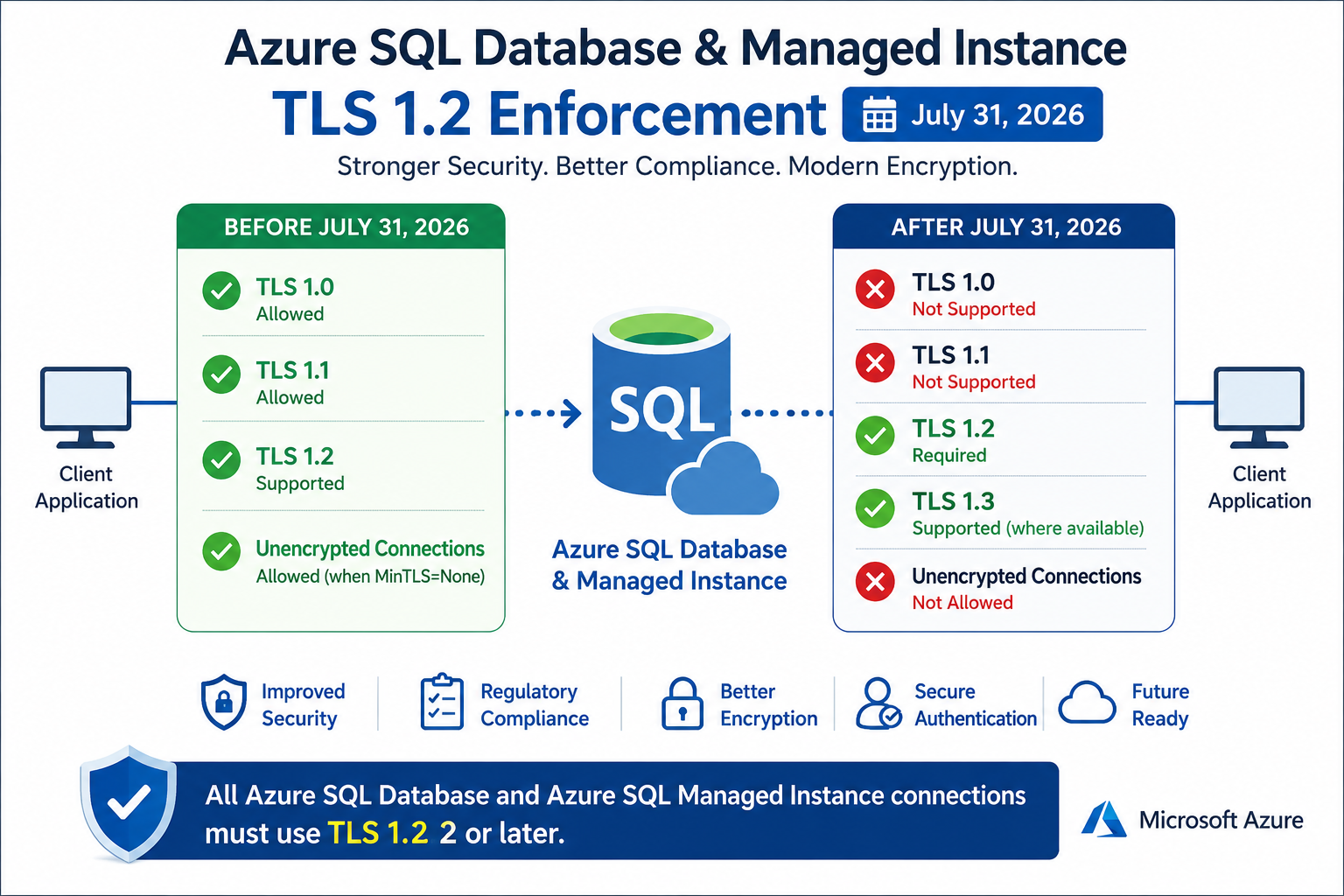
Microsoft is strengthening the security of Azure SQL Database and Azure SQL Managed Instance (MI) by fully enforcing Transport Layer Security (TLS) 1.2 as the minimum supported protocol.
As part of this security enhancement:
- TLS 1.0 and TLS 1.1 have already been retired.
- The “No Minimum TLS (MinTLS = None)” option is being removed.
- All Azure SQL Database and Managed Instance connections must use TLS 1.2 or later.
- Unencrypted connections will no longer be supported.
This change aligns Azure SQL with modern security standards and compliance requirements such as PCI DSS, HIPAA, and other industry regulations.
Why is Microsoft Making This Change?
Older TLS versions (TLS 1.0 and TLS 1.1) contain known security vulnerabilities and no longer meet modern security requirements.
Benefits of enforcing TLS 1.2 include:
- Stronger encryption
- Improved protection against cyber threats
- Better compliance with security regulations
- Elimination of insecure and unencrypted database connections
What is Changing?
Previously, Azure SQL allowed administrators to configure:
Minimum TLS Version = None- Any TLS version
- Unencrypted client connections
After July 31, 2026, this configuration will no longer exist.
Instead:
- Minimum TLS Version will automatically become TLS 1.2
- All connections must use TLS 1.2 or higher
- Unencrypted connections will be rejected
Timeline of TLS Retirement
| Effective Date | MinTLS = None | MinTLS Left Blank |
|---|---|---|
| Before August 31, 2025 | ✅ Any TLS Version + Unencrypted | ✅ Any TLS Version + Unencrypted |
| After August 31, 2025 | ⚠️ TLS 1.2 + Unencrypted | ✅ Defaults to TLS 1.2 |
| After July 31, 2026 | 🔒 Automatically Changed to TLS 1.2 | 🔒 Defaults to TLS 1.2 |
What Happens During Server Creation?
After July 31, 2026, when creating Azure SQL Database or Managed Instance using:
- Azure CLI
- PowerShell
- ARM Templates
- REST API
- Terraform
- Bicep
the following behavior applies:
| Configuration | Before July 31, 2026 | After July 31, 2026 |
|---|---|---|
| Minimum TLS Version | MinTLS = None supported | ✅ TLS 1.2 enforced |
| TLS 1.0 Connections | ✅ Allowed | ❌ Not Supported |
| TLS 1.1 Connections | ✅ Allowed | ❌ Not Supported |
| TLS 1.2 Connections | ✅ Supported | ✅ Required |
| Unencrypted Connections | ✅ Allowed (when MinTLS=None) | ❌ Not Allowed |
| Azure Portal | MinTLS=None available | MinTLS=None removed |
| Client Compatibility | Legacy clients may connect | Clients must support TLS 1.2 or higher |
The Azure Portal has already removed the “None” option.
Connection Errors You May See
Applications attempting to connect using:
- TLS 1.0
- TLS 1.1
- Unencrypted connections
will fail with Gateway errors similar to:
Error 47072
Error 171Who is Impacted?
Most customers do not need to take any action because modern operating systems, SQL drivers, and frameworks already support TLS 1.2.
However, organizations should verify older applications that use:
- Legacy JDBC Drivers
- Older ODBC Drivers
- SQL Native Client
- Older .NET Framework versions
- Legacy Java Runtime Environments (JRE)
- Older Linux OpenSSL libraries
- Third-party database connectivity tools
Recommended Actions
Microsoft recommends verifying that all applications connecting to Azure SQL support TLS 1.2 or later.
Checklist
✔ Verify application compatibility
✔ Update SQL drivers
✔ Update JDBC drivers
✔ Upgrade .NET Framework if required
✔ Upgrade Java Runtime (JRE)
✔ Test database connectivity
✔ Remove dependencies on TLS 1.0/1.1
✔ Verify connection strings
✔ Perform application regression testing
How to Check the Current Minimum TLS Version
For Azure SQL Database and Azure SQL Managed Instance:
- Open the Azure Portal
- Navigate to your SQL Server
- Open Networking
- Review the Minimum TLS Version
Expected value:
TLS 1.2Best Practices
To ensure compatibility and security:
- Always use the latest Microsoft Data Provider.
- Keep SQL client libraries updated.
- Upgrade unsupported operating systems.
- Remove legacy encryption protocols.
- Enable strong cipher suites.
- Regularly test application connectivity after driver updates.
Benefits of TLS 1.2 Enforcement
| Benefit | Description |
|---|---|
| Improved Security | Protects data using stronger encryption protocols and modern security standards. |
| Regulatory Compliance | Meets compliance requirements such as PCI DSS, HIPAA, ISO 27001, and other industry standards. |
| Better Encryption | Eliminates outdated cryptographic algorithms by enforcing TLS 1.2 or later. |
| Secure Authentication | Provides stronger authentication and secure client-server communication. |
| Future Ready | Supports Microsoft’s modern Azure security architecture and future enhancements. |
Frequently Asked Questions (FAQ)
Will my existing Azure SQL Database stop working?
No. Most applications already use TLS 1.2 and will continue working without any changes.
Will TLS 1.0 or TLS 1.1 still work?
No. After July 31, 2026, these protocols will no longer be accepted.
Are unencrypted connections supported?
No. Azure SQL Database and Managed Instance will reject all unencrypted client connections.
Do I need to change the Minimum TLS setting manually?
No. If your server is configured with MinTLS = None, Azure will automatically update it to TLS 1.2.
Which Azure SQL services are affected?
- Azure SQL Database
- Azure SQL Managed Instance
Summary
After July 31, 2026, Azure SQL Database and Azure SQL Managed Instance will enforce TLS 1.2 as the minimum supported protocol for all client connections. The “No Minimum TLS (MinTLS = None)” configuration will be removed, and any existing servers using this setting will be automatically updated to require TLS 1.2. Connections using TLS 1.0, TLS 1.1, or unencrypted communication will fail. While most modern applications are already compatible, organizations should verify legacy applications and database drivers to ensure uninterrupted connectivity.
Key Takeaways
| Item | Status After July 31, 2026 |
|---|---|
| TLS 1.0 | ❌ Not Supported |
| TLS 1.1 | ❌ Not Supported |
| TLS 1.2 | ✅ Required |
| TLS 1.3 | ✅ Supported (where available) |
| MinTLS = None | ❌ Removed |
| Unencrypted Connections | ❌ Not Allowed |
| Existing Servers with MinTLS=None | ✅ Automatically Updated to TLS 1.2 |
| Action Required | Verify legacy applications and database drivers support TLS 1.2 or later. |
[sqltalent_disclaimer]
