
SQL Server Login & Permission Audit Report Using Database Mail
Overview
Managing and reviewing user access is a critical part of database administration and information security. Organizations regularly perform Internal Audit (IA), User Access Review (UAR), and compliance assessments to ensure that users have only the permissions required to perform their duties.
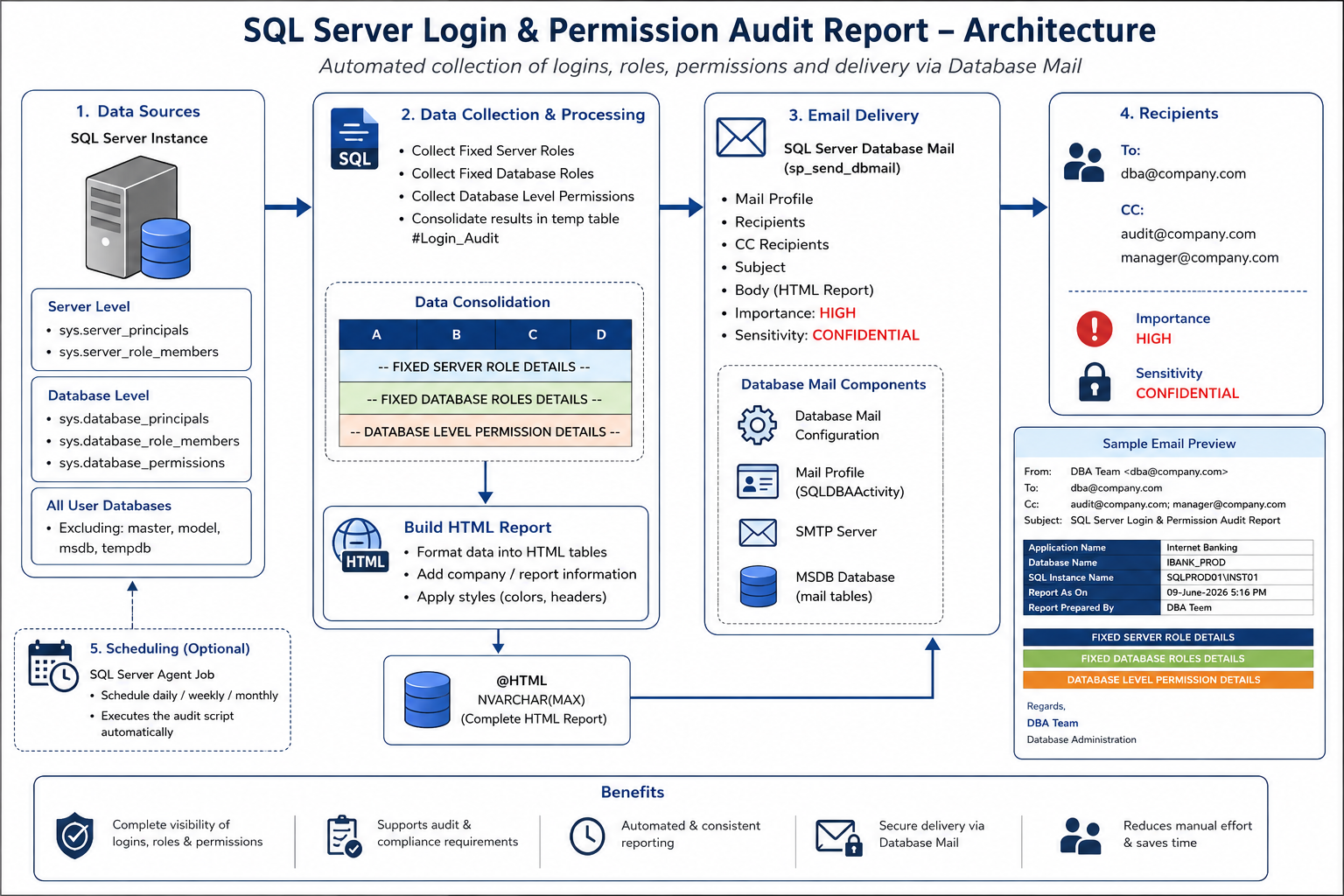
This SQL Server script automates the collection of login information, role memberships, and database permissions across SQL Server databases and delivers the results in a professionally formatted HTML email using Database Mail.
Key Features
| Feature | Description |
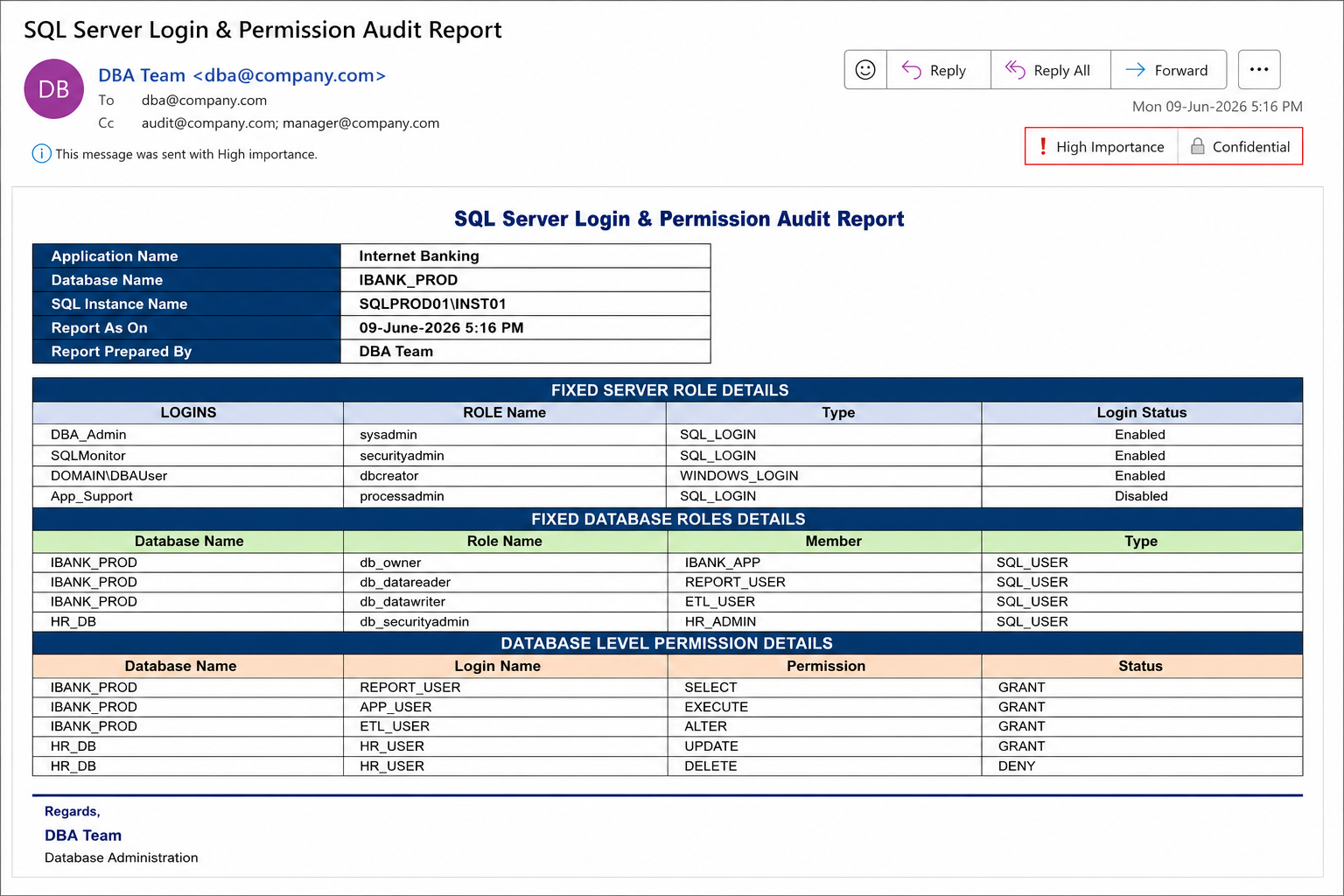
| Fixed Server Role Audit | Captures server-level role memberships such as sysadmin, securityadmin, dbcreator, serveradmin, and bulkadmin. |
| Fixed Database Role Audit | Collects database role memberships such as db_owner, db_datareader, db_datawriter, and db_securityadmin. |
| Database Permission Audit | Reports explicit permissions such as SELECT, INSERT, UPDATE, DELETE, EXECUTE, ALTER, and CONTROL. |
Fixed Server Role Audit
| Information Captured |
| Login Name |
| Server Role Name |
| Login Type |
| Login Status (Enabled/Disabled) |
Fixed Database Role Audit
| Information Captured |
| Database Name |
| Database Role |
| Role Member |
| Principal Type |
Database Level Permission Audit
| Permissions Captured |
| SELECT |
| INSERT |
| UPDATE |
| DELETE |
| EXECUTE |
| ALTER |
| CONTROL |
Professional HTML Report
| Report Component | Purpose |
| Application Name | Identifies the application being audited |
| Database Name | Identifies the target database |
| SQL Instance Name | Identifies the SQL Server instance |
| Report Date | Shows when the report was generated |
| Prepared By | Indicates report ownership |
Benefits
| Benefit | Description |
| Audit Readiness | Reduces manual effort during audits. |
| Security Visibility | Provides complete visibility into SQL Server access. |
| Automation | Eliminates manual collection and reporting activities. |
| Compliance Support | Supports ISO 27001, PCI DSS, SOX, and internal audits. |
Prerequisites
| Requirement |
| Database Mail must be configured. |
| SQL Server Agent should be running for scheduling. |
| Appropriate permissions must exist. |
| Database Mail profile must be operational. |
Script
| SQL Script |
| /*====================================================== SQL Server Login & Permission Audit Report =======================================================*/ IF EXISTS (SELECT * FROM tempdb.sys.all_objects WHERE name LIKE ‘%#Login_Audit%’) DROP TABLE #Login_Audit;CREATE TABLE #Login_Audit ( A NVARCHAR(500), B NVARCHAR(500) DEFAULT(”), C NVARCHAR(200) DEFAULT(”), D NVARCHAR(200) DEFAULT(”) );/*===================================================== FIXED SERVER ROLES =======================================================*/ INSERT INTO #Login_Audit (A,B,C,D) SELECT ‘– FIXED SERVER ROLE DETAILS –‘,’—–‘,’—–‘,’—–‘; INSERT INTO #Login_Audit (A,B,C,D) SELECT ‘LOGINS’,’ROLE Name’,’Type’,’Login Status’; INSERT INTO #Login_Audit (A,B,C,D) SELECT a.name, c.name, a.type_desc, CASE a.is_disabled WHEN 1 THEN ‘Disabled’ ELSE ‘Enabled’ END FROM sys.server_principals a INNER JOIN sys.server_role_members b ON a.principal_id = b.member_principal_id INNER JOIN sys.server_principals c ON c.principal_id = b.role_principal_id WHERE a.name NOT LIKE ‘NT AUTHORITY%’ AND a.name NOT LIKE ‘NT SERVICE%’ ORDER BY c.name; /*============================================== FIXED DATABASE ROLES ===============================================*/ INSERT INTO #Login_Audit (A,B,C,D) INSERT INTO #Login_Audit (A,B,C,D) INSERT INTO #Login_Audit /*======================================================== INSERT INTO #Login_Audit (A,B,C,D) INSERT INTO #Login_Audit (A,B,C,D) INSERT INTO #Login_Audit SELECT /*===================================================== DECLARE @HTML NVARCHAR(MAX); SET @HTML = N’ <html> body table td .section </style> <body> <h2 style=”color:#1F4E78;”> <table style=”width:60%;margin-bottom:15px;”> <tr> <tr> <tr> <tr> </table> <br> <table>’; SELECT @HTML = @HTML + WHEN A LIKE ‘– FIXED SERVER ROLE DETAILS%’ THEN WHEN A LIKE ‘– FIXED DATABASE ROLES DETAILS%’ THEN WHEN A LIKE ‘– DATABASE LEVEL PERMISSION DETAILS%’ THEN /* Fixed Server Role Header */ /* Fixed Database Role Header */ /* Database Permission Header */ ELSE END SET @HTML = @HTML + ‘ </table> Regards,<br> </td> </tr> </body> /*======================================================== EXEC msdb.dbo.sp_send_dbmail |
| Sample Mail |
 |
| SQL Server audit report workflow diagram |
 |
Conclusion
This SQL Server Login & Permission Audit Report provides database administrators with an efficient method to review and monitor access across SQL Server environments.
By combining server role auditing, database role auditing, and database permission auditing into a single HTML report, organizations can improve security governance, streamline audit activities, and maintain compliance with internal and external requirements.
A well-designed audit report not only saves time but also helps ensure that database access remains secure, controlled, and fully documented.
